

Major changes are rolling out in Microsoft 365 this November 2025, marking one of the broadest waves of updates, feature retirements, and licensing shifts in recent memory. If you missed October’s changes, you can find them here, but admins, users, and IT leaders alike should prepare for the substantial landscape shift across Exchange, SharePoint, Teams, OneNote, and licensing agreements—affecting how organizations manage collaboration, security, automation, and costs.
Microsoft 365 November 2025: What’s New?

-
Retirements: 6 features out (including Lists iOS/Android apps, SP.Utilities.Utility.SendEmail API, “Mobile Devices” page in Outlook, and others).
-
New Features: 9 new capabilities including AI-powered Knowledge Agent, expanded Teams security, and Workflows modernization.
-
Enhancements: 5 areas receiving improvements, mainly in security, automation, and usability.
-
Functionality Changes: 2, including changes to Teams “Files” tab and Copilot/Places calendar.
-
Action Required: 3 key features will need admin attention to transition.
Major Retirements
-
SP.Utilities.Utility.SendEmail API retires October 31, 2025. All email functionality relying on this will stop, pushing customers to modern alternatives.
-
Mobile Devices page retirement (Outlook Web + New Outlook): On November 6, users lose this option for viewing/managing sync devices. Management shifts to Exchange admin tools.
-
“Visualize” Options in SharePoint: Quick Power BI report creation via “Visualize the List/Library” is going away; admins must rely on manual Power BI setup for reporting simplicity.
-
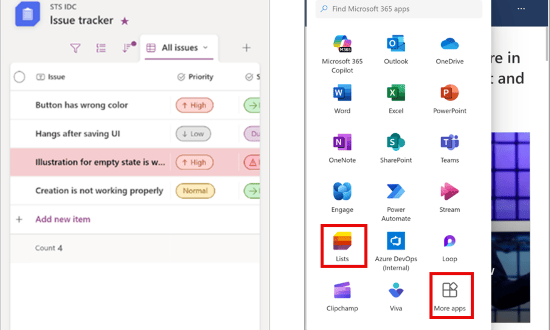
Lists Mobile Apps (iOS/Android): By mid-November, apps are removed from app stores and existing users are directed to the browser or Windows desktop for access—no data loss, but workflow changes.

Lists Mobile Apps (iOS/Android) -
Desktop Notifications in Viva Engage: Moves to unified notification infrastructure; users will rely on email and native OS notifications instead.
-
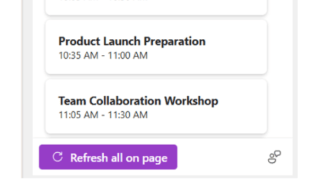
OneNote Meeting Details ‘Refresh all on page’ option: Will be gone as of November 15, 2025. Users can still manually update meeting details, but the convenient auto-refresh will disappear.

“Refresh all on page” Button
New Features and Functionality
-
Auto-Archiving for Exchange Online: Public preview launches for Target Release tenants. When a mailbox approaches full (96%+ quota), old emails auto-move to the archive, preventing storage shutdowns and manual mailbox management.
-
Knowledge Agent for SharePoint: Early adopters get AI-driven content curation, with Knowledge Agent indexing, organizing, and enriching SharePoint sites to enhance Copilot’s contextual answers.
-
Admin Consent for Entra Applications: Major security tightening—all third-party apps needing to access Teams or Exchange APIs now require admin consent, closing a common avenue for phishing and shadow IT.
-
Teams RBAC for SMTP.SendAsApp: Directly assigns app send permissions via RBAC, so admins no longer must script permissions mailbox-by-mailbox.
-
Entra ID FIDO2 Passkey Profile Support: Expanded passwordless sign-in choices and improved FIDO2 authentication method policies for enterprise identity.
-
Enterprise Application Insights: SharePoint admins get a new monitoring dashboard—see what third-party apps are touching corporate data in real-time.
-
Microsoft Purview + Insider Risk Management/DSI: Pre-scoped investigations streamline monitoring risky behaviors, data leakage, and insider threats.
-
Immersive Events in Teams: Reaches general availability Nov 14, bringing mixed-reality meetings to life.
-
SharePoint Modern Workflows: Modern automation flows via Power Automate are now first-class, spanning lists, libraries, and Teams chats.
-
Teams Guest Chat via Email: Secure, frictionless chat with external partners via email invite; external contacts join as guests without an MSA or O365 account.
Enhancements & Automation
-
SharePoint Version History: Edits in grid view now merge into one version instead of cluttering the version history, saving space and simplifying rollbacks.
-
Defender for Office 365 Quarantine: Smoother quarantine phishing preview, with more granular visibility and security for released messages.
-
Purview Data Loss Prevention: Inspects/control file traffic at the network edge through Entra Global Secure Access, strengthening leak protection as files transit between services.
-
Conditional Access/Ediscovery in Purview: Improved compliance. Admins must use Entra Conditional Access for key eDiscovery actions, and get enhanced audit trails with new ‘FilePreviewed’ logs.
-
Quarantine Usability: Quarantined messages are now displayed “per recipient,” and ‘ReleaseToAll’ in the quarantine cmdlet applies mailbox-by-mailbox, reducing accidental broad releases.
Key Functionality & Workflow Shifts
-
Teams “Files” Tab Becomes “Shared”: Now aggregates not just library files, but any file/link shared in channel conversations—centralizing collaboration history.
-
Teams Calendar Update: New Copilot-integrated calendar debuts. Legacy calendar and view toggles are retired.
Action Required For Admins
-
Team Guidance (Microsoft Places) Retirement: This tool for in-office scheduling/team priorities is gone. Transition to Microsoft 365 Groups for scheduling.
-
UKG/Blue Yonder Connectors for Shifts: Sync connectors sunset Nov 14, 2025—move to UKG Flow app or build your own integrations.
-
Viva Insights Export (via MGDC): No longer available—migrate to the Power BI Connector in Microsoft Fabric or use CSV export.
Teams, Licensing, and Pricing: Major Marketplace & EA Shifts
-
Teams Returns To Suites: As of Nov 1, customers worldwide can once again purchase M365 and O365 bundles “with Teams” included—a reversal of a prior compliance move in Europe. Standalone Teams and no-Teams SKUs also remain for customer choice, with new price differentials (e.g., E3/E5 suites price delta of about $8.55 with vs. without Teams).
-
Enterprise Agreement Pricing Overhaul: No more tiered volume discounts on Online Services. ALL commercial customers pay Level A (public list) pricing at renewal under EA, MPSA, and OSPA agreements, with mid-large orgs facing 6–12% price increases. Small orgs with fewer than 2,400 licenses won’t have their EA renewed at all and must move to a CSP (Cloud Solution Provider).
-
No Change for On-Prem and EDU/GOV: These price shifts do NOT affect U.S. Government, Education, or on-premises licensing.
User Experience & Security Highlights
-
Teams iPad users can now choose audio/video devices right from the meeting UI—no extra settings apps needed.

-
New Phishing Protection in Teams: Now displays warnings for malicious URLs, raising threat awareness for regular users and frontline staff.
-
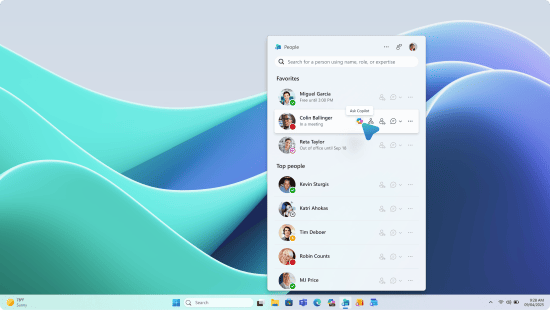
Next-Gen Companion Apps (Coming Dec 2025): Microsoft pre-announces new taskbar companion apps (People, Files, Calendar) for better M365 navigation, plus image search filtering in Teams.

Companion Apps -
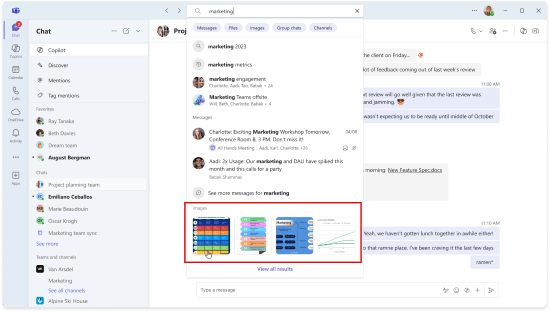
Introducing Image Search in Microsoft Teams: You’ll soon have the ability to locate images within Teams chats and channels by searching for specific keywords in the message, the person who sent it, or the location where the image was posted.

Microsoft Teams image search

Recommendations for Admins
-
Audit dependencies on retirements: Especially Lists mobile, old Power BI visuals, and custom workflows using the deprecated sendEmail API.
-
Communicate the UI changes: Especially the new Teams “Shared” tab, new calendar integration, and broader guest access.
-
Review licensing contracts now: Forecast cost implications, especially for EA and large deployments, given price model changes.
-
Prepare for stricter app consent: Ensure vetted approval procedures for third-party app requests to avoid disruption.
Microsoft 365’s November 2025 update brings sweeping modernization alongside security, compliance, and fiscal impacts. Be sure to check the recent changes in Office 2016, Excel 2016, and more. Organizational agility, robust change management, and proactive communication with IT stakeholders will be more important than ever to ensure a smooth transition.
Discover more from Microsoft News Now
Subscribe to get the latest posts sent to your email.
