

October brings significant changes to the Microsoft 365 ecosystem, including the recent Microsoft 365 Premium announcement, with both productivity enhancements and vital security advisories for professionals and organizations using these cloud-based solutions. From game-changing Teams flexibility on iPad to lifecycle news that will affect millions of Windows and Office users, here’s everything that matters this month in Microsoft 365 October 2025 (see September 2025).
Microsoft 365 October 2025 Feature Updates: Teams, Outlook, Word
- Microsoft Teams now supports external audio and camera devices on iPad. Users can quickly select devices in the pre-join screen or during meetings, making remote work more flexible and improving collaboration quality for mobile and hybrid workers.

- Teams private channels transition to channel mailboxes, lifting team limits to 1,000 channels and 5,000 members per channel. This enables better management of private meetings, streamlined compliance policies, and comprehensive support for large-scale collaboration.
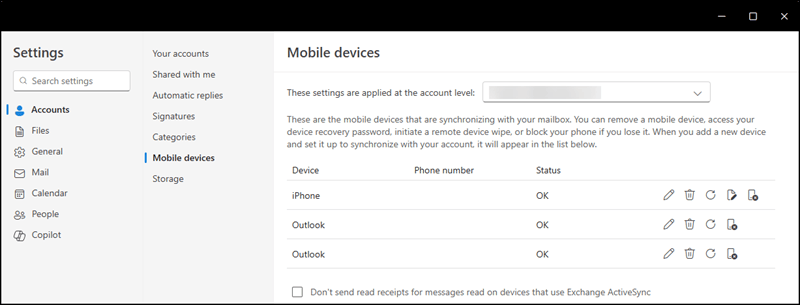
- Outlook’s Mobile Devices Settings page is being retired. Device management now moves to the My Account portal or Intune. While daily email remains unaffected, administrators and users should transition management workflows as this setting disappears from Outlook and Outlook Web App.

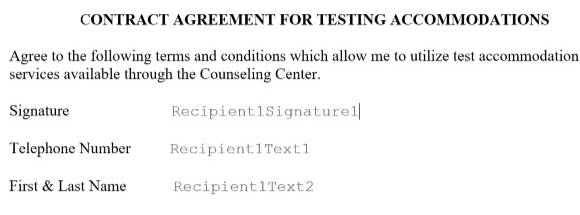
- Word’s eSignature now includes free text fields, allowing signers to enter names, dates, and notes directly in signature requests. This improvement streamlines digital signing for organizations needing quick, custom input during electronic document approvals.

- Teams Phone devices receive real-time transfer status and confirmations, reducing missed calls and confusion during call transfers. The upgrade works across all hardware, improving experience for frontline and hybrid workers.
- Teams chats now support Collaborative Notes. Meeting participants can create, edit, and share notes live without leaving the chat, reducing app switching and keeping teams in sync throughout projects and meetings.
- Copilot app installs automatically on Windows devices this October, bringing AI-powered suggestions and automation features company-wide. IT admins can expect new SharePoint Embedded filtering, unified Teams management, and expanded admin controls across Microsoft 365 services.
Feature Retirements & Security Alerts
Outlook Lite app will be retired starting October 6, 2025, meaning new installs will be blocked, though current users can continue using it for now.
Important security updates are now available for Excel, Word, PowerPoint, Visio, and the overall Office suite, patching critical vulnerabilities (CVE-2025-54896 through CVE-2025-54910). Enterprise and personal users are encouraged to check for updates to stay protected from emerging threats.
Product Lifecycle: End-of-Support and Migration Plans
Windows 10 and Office 2016/2019 support officially end October 14, 2025. Organizations and home users must plan upgrades to Windows 11 or Office 2021/Microsoft 365 to avoid security risks, lack of new features, and limited technical support. Extended Security Updates (ESU) are offered for another three years (until October 10, 2028) for Microsoft 365 Apps on Windows 10 with limited support, giving enterprises some time to prepare for migration.
Support scenario highlights:
-
Microsoft 365 Apps will continue to receive security patches on Windows 10 until October 2028 through standard channels, but feature updates will stop with Version 2608, depending on subscription channel.
-
Microsoft’s official stance: If issues occur only on Windows 10 (not Windows 11), support may be limited or suggest migrating to newer products.
Exciting OneNote Enhancements
This month’s feature wave brings several OneNote upgrades:
-
Merge table cells on Windows and Mac platforms
-
Use Ctrl+Shift+V for paste as plain text across devices
-
Improved page margins and creation in mobile apps
-
Hide Copilot/Notebook icons for cleaner workspaces
-
Updated Class Notebook toolbar to simplify classroom workflows.
Admin & Compliance Upgrades
- Copilot, SharePoint, OneDrive, Teams, and Defender for Office 365 receive new admin controls for automation, compliance, and quota management. Particularly Copilot-licensed tenants benefit from higher limits and more options for streamlined AI-powered collaboration and security workflows.
- Exchange Online ceases support for shared service principals in hybrid deployments. Admins must update configurations to ensure continued functionality and compliance in hybrid Microsoft 365 environments.
Take Action
With these sweeping changes across the Microsoft 365 landscape, all organizations should make reviewing and applying security patches, updating user training, and planning migrations away from unsupported platforms a top priority. Admins should use enhanced controls to streamline device management and user experience as Microsoft rapidly expands Copilot-powered automation. Large enterprises must review hybrid service principal usage in Exchange Online to avoid compatibility issues after this month’s updates.
For full release notes and guidance, Microsoft links and help articles provide valuable step-by-step transition support:
Stay tuned to msftnewsnow.com for the latest Microsoft 365 updates, guides, and migration tips to help keep your workflow safe, productive, and future-ready.
Discover more from Microsoft News Now
Subscribe to get the latest posts sent to your email.
