

Microsoft has officially rolled out a major under-the-hood change to how Windows 11 handles sign-ins with Microsoft Entra ID (formerly Azure AD), and it’s now generally available for all Windows 11 24H2 and later devices. Starting with the December 9, 2025 cumulative update (KB5072033, OS builds 26200.7462 and 26100.7462), Entra ID authentication via Web Account Manager (WAM) can now run on WebView2, the Chromium-based web control that powers modern web experiences inside Windows apps.
This shift is more than just a browser engine swap — it’s a foundational move toward faster, more secure, and more consistent sign-in flows across Microsoft 365, Teams, Edge, Office, and other enterprise and consumer apps that rely on Entra ID.
What’s changing in Windows 11 sign-in?
At a high level, Microsoft is modernizing the way Windows apps authenticate with Microsoft Entra ID by replacing the older EdgeHTML-based WebView with WebView2, which is built on the same Chromium engine that powers Microsoft Edge and many modern desktop apps.
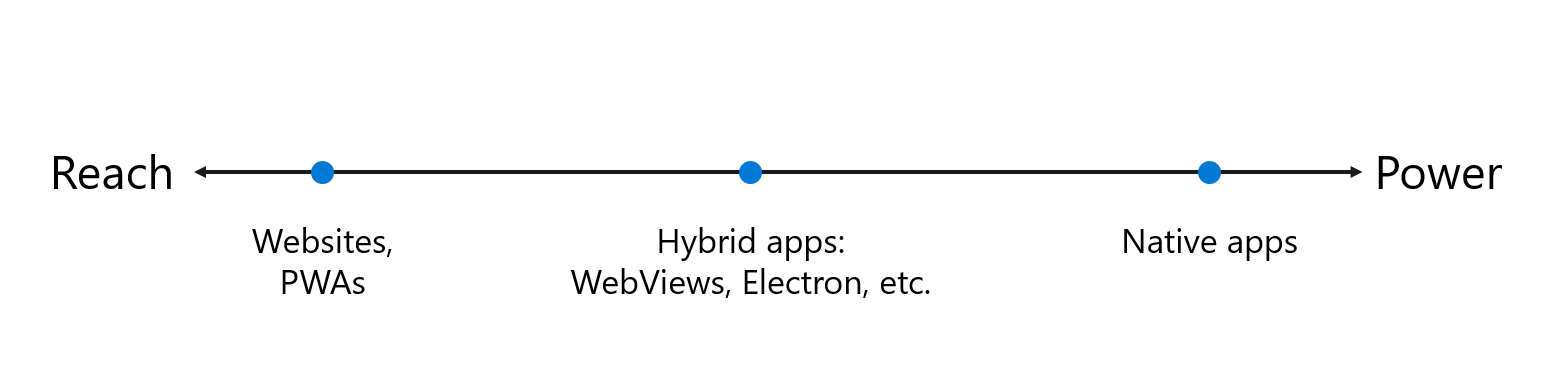
WebView2 is essentially a lightweight, embedded browser that lets apps show web content (like login pages, consent prompts, or MFA screens) directly inside the app window, without launching a full browser. In this case, it’s being used by Web Account Manager (WAM) to handle Entra ID sign-ins for work, school, and Microsoft accounts.
Previously, those embedded sign-in dialogs used the legacy EdgeHTML engine, which is now deprecated. With this update, organizations and users can opt in to using the Chromium-based WebView2 instead, which brings modern web standards, better performance, and improved compatibility with today’s identity providers and frameworks.
Why WebView2 matters for Microsoft Entra ID
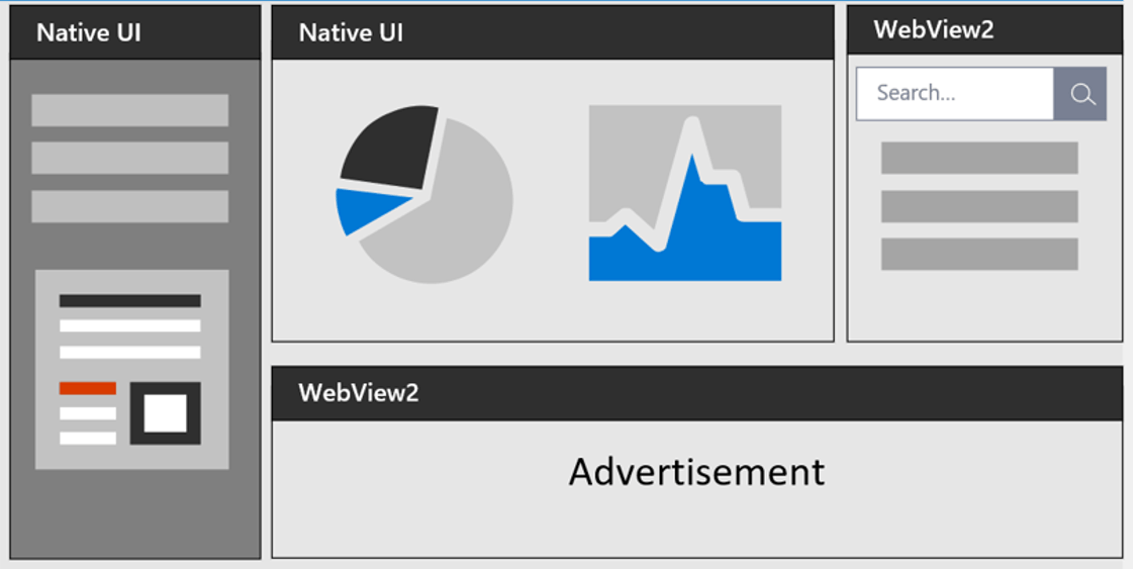
Microsoft frames this change as a “strategic investment” in secure, user-friendly identity experiences, and there are several concrete benefits:
-
Modern web standards support
WebView2 is based on Chromium, so it supports the latest HTML, CSS, and JavaScript features. That means richer, more responsive sign-in UIs, better support for modern frameworks like React and Fluent UI, and fewer rendering issues with custom branding or conditional access policies. -
Better compatibility with third-party identity providers
Many enterprise apps and SaaS services use modern web frameworks and rely on specific browser behaviors. The older EdgeHTML WebView sometimes struggled with these, leading to broken layouts, script errors, or failed redirects. WebView2’s Chromium foundation dramatically improves compatibility with these providers. -
Future-ready for passwordless and advanced scenarios
Microsoft is pushing hard on passwordless sign-in (Windows Hello, FIDO2 passkeys, Microsoft Authenticator, etc.) and Conditional Access. WebView2 is better equipped to handle these advanced scenarios with fewer redirects, less friction, and more consistent behavior across apps. -
More consistent experience across apps
Whether you’re signing into Teams, Office, Edge, Feedback Hub, or a custom line-of-business app, the sign-in flow now looks and behaves more like a modern browser experience. That reduces confusion for end users and makes troubleshooting easier for IT.
How to enable WebView2 for Entra ID in Windows 11
This update is available on Windows 11 24H2 and later builds (26200.7462 and 26100.7462 or newer) via KB5072033. Once the OS is updated, admins can opt in to WebView2 integration for Entra ID by setting a simple registry key.
Registry configuration (opt-in)
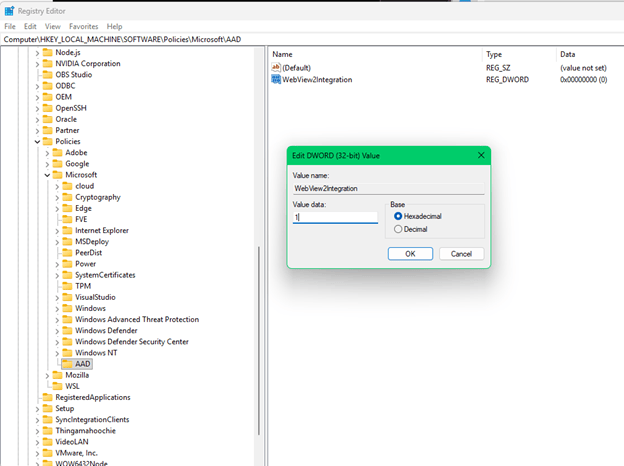
To enable WebView2 for Entra ID authentication:
-
Open Registry Editor (
regedit) as an administrator. -
Navigate to (or create, if it doesn’t exist):
HKEY_LOCAL_MACHINE\SOFTWARE\Policies\Microsoft\Windows\AAD -
Create a new DWORD (32-bit) value named
WebView2Integration. -
Set its value to
1to enable WebView2 integration.
[HKEY_LOCAL_MACHINE\SOFTWARE\Policies\Microsoft\Windows\AAD]

"WebView2Integration"=dword:00000001
After setting the key, no reboot is required. The change takes effect immediately, and the next time a user signs in with Entra ID (e.g., adding a work account in Teams, Office, or Edge), the flow will use WebView2.
Registry configuration (opt-out)
If you encounter issues and need to fall back to the legacy EdgeHTML WebView:
-
Go to the same registry path:
HKEY_LOCAL_MACHINE\SOFTWARE\Policies\Microsoft\Windows\AAD -
Set the
WebView2IntegrationDWORD value to0.
[HKEY_LOCAL_MACHINE\SOFTWARE\Policies\Microsoft\Windows\AAD]

"WebView2Integration"=dword:00000000
Microsoft notes that this is an opt-in change for now, but WebView2 will become the default framework for WAM authentication in a future Windows release, and the EdgeHTML WebView will be deprecated.
What this means for end users
For most end users, this change will be invisible. They’ll continue to sign in to their work or school accounts in apps like Teams, Outlook, and Edge the same way they always have — but the underlying experience will be smoother and more reliable.
Users may notice:
-
Faster loading of sign-in pages and MFA prompts.
-
Fewer “page not supported” or script errors during login.
-
A more modern, browser-like look and feel in embedded dialogs.
-
Better support for passwordless methods like Windows Hello and passkeys.
If an organization has already configured browsers to work with Entra ID (e.g., allowing Edge-based sign-ins, configuring Conditional Access, or using AD FS with Windows Integrated Authentication), the transition to WebView2 should be seamless.
What this means for IT admins and enterprises
For IT teams, this is a “prepare now, mandatory later” kind of change. Microsoft is encouraging admins to:
-
Update Windows 11 devices to at least build 26200.7462 / 26100.7462 (KB5072033 or later).
-
Deploy the
WebView2Integration=1registry policy in test environments first. -
Monitor sign-in flows in key apps (Teams, Office, Edge, LOB apps) for any issues.
-
Update proxy rules, firewall rules, and any services involved in the logon process that may be sensitive to browser user-agent strings or specific browser behaviors.
Microsoft also points admins to two key resources:
If you’re using AD FS or other on-prem identity providers, it’s worth reviewing those docs to ensure your WIA and user-agent rules are compatible with Chromium-based browsers and WebView2.
WebView2 as the default
Microsoft is clear that this is not just a one-off feature — it’s part of a broader move to make WebView2 the default framework for WAM authentication in a future Windows release. That means:
-
The legacy EdgeHTML WebView will eventually be deprecated and removed.
-
All Entra ID sign-in flows in Windows apps will run on Chromium-based WebView2 by default.
-
Organizations that haven’t opted in now will be automatically migrated later.
Microsoft is urging customers to “deploy now and participate in the opt-in process” so they can:
-
Test and validate the experience in their environment.
-
Make any necessary adjustments (proxy rules, code changes, etc.).
-
Provide feedback through Customer Support Services if they run into issues.
Practical next steps for organizations
If you’re responsible for managing Windows 11 and Entra ID in your organization, here’s what you should do:
-
Update Windows 11
Ensure devices are on Windows 11 24H2 or later with KB5072033 (build 26200.7462 / 26100.7462) or newer. -
Deploy WebView2 runtime
Make sure the WebView2 runtime is installed (it’s available via the evergreen installer or bundled with many apps). Most modern Windows 11 devices already have it. -
Test in a pilot group
EnableWebView2Integration=1in a small group of test devices and monitor sign-in flows in Teams, Office, Edge, and any custom apps. -
Review identity and proxy configurations
Check that your Conditional Access policies, AD FS, and any on-prem identity providers work correctly with Chromium-based browsers and WebView2. -
Plan for the default switch
Start treating WebView2 as the future baseline for Entra ID sign-ins and plan to migrate all environments before the legacy WebView is deprecated.
WebView2 marks the start of a new default for identity in Windows 11, not just another optional checkbox for admins. As Microsoft moves Entra ID sign-ins away from the legacy EdgeHTML WebView, organizations that adopt WebView2 early will get smoother authentication, better compatibility with modern apps, and a path ready for passwordless and Conditional Access–heavy environments. By planning, testing, and standardizing on WebView2 now, IT teams can turn this mandatory future change into an opportunity to modernize their sign-in experience on their own terms.
Discover more from Microsoft News Now
Subscribe to get the latest posts sent to your email.
