
Microsoft’s latest Power Platform feature update for February 2026 is a big one for both app makers and IT teams, blending deeper Copilot integration, modernized app experiences, and stronger governance tools. The release spans everything from in‑app Microsoft 365 Copilot chat and agent‑driven automation, to new UI controls, theme reuse, and a long‑requested way to move apps out of the cluttered default environment.
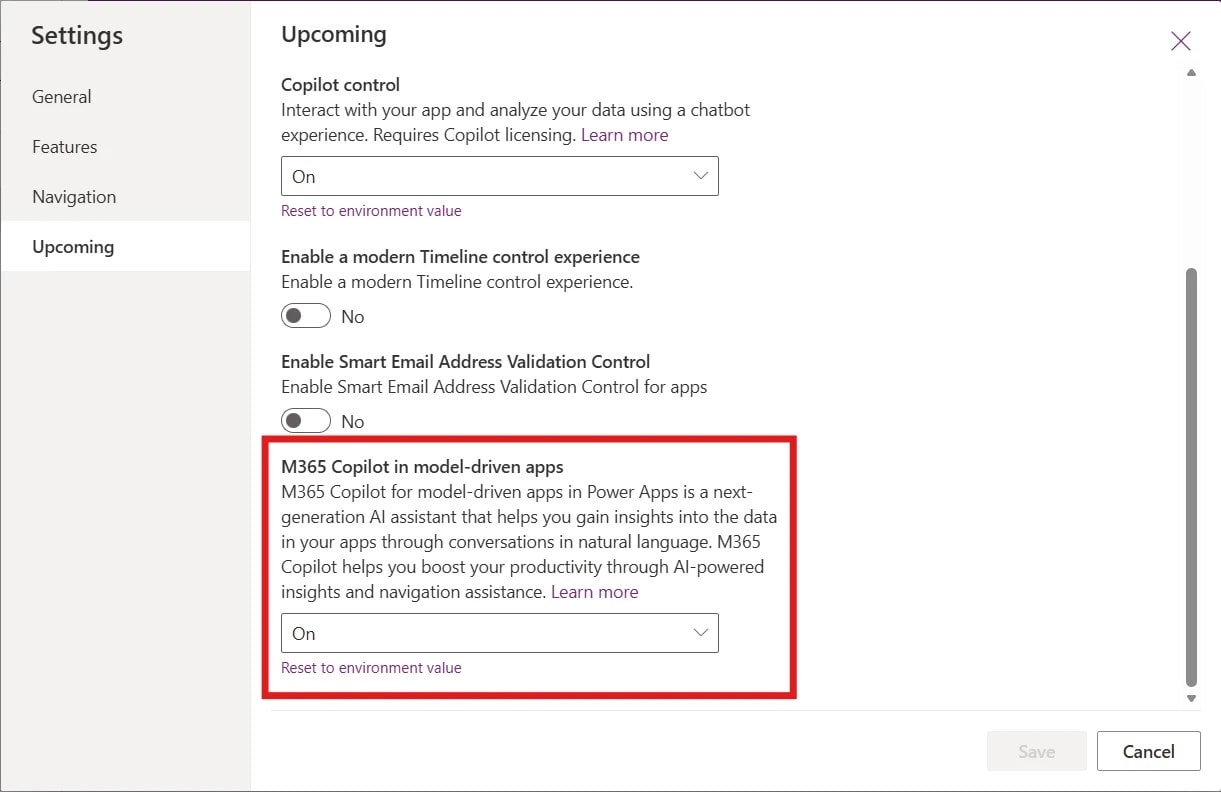
In a new post titled “What’s new in Power Platform: February 2026 feature update,” Tiffany Treacy, Vice President of Product for Power Platform at Microsoft, walks through the full set of changes, highlighting updates across “Apps, agents and Copilot,” “Building modern apps,” and “Managed platform” capabilities.
Copilot, Agents, and Human‑in‑the‑Loop Collaboration
On the AI side, Microsoft continues to deepen the connection between apps and agents, with a focus on human supervision rather than fully hands‑off automation. The update brings the Power Apps Model Context Protocol (MCP) Server and an enhanced agent feed into public preview, enabling richer collaboration between AI agents and business users directly inside model‑driven applications.
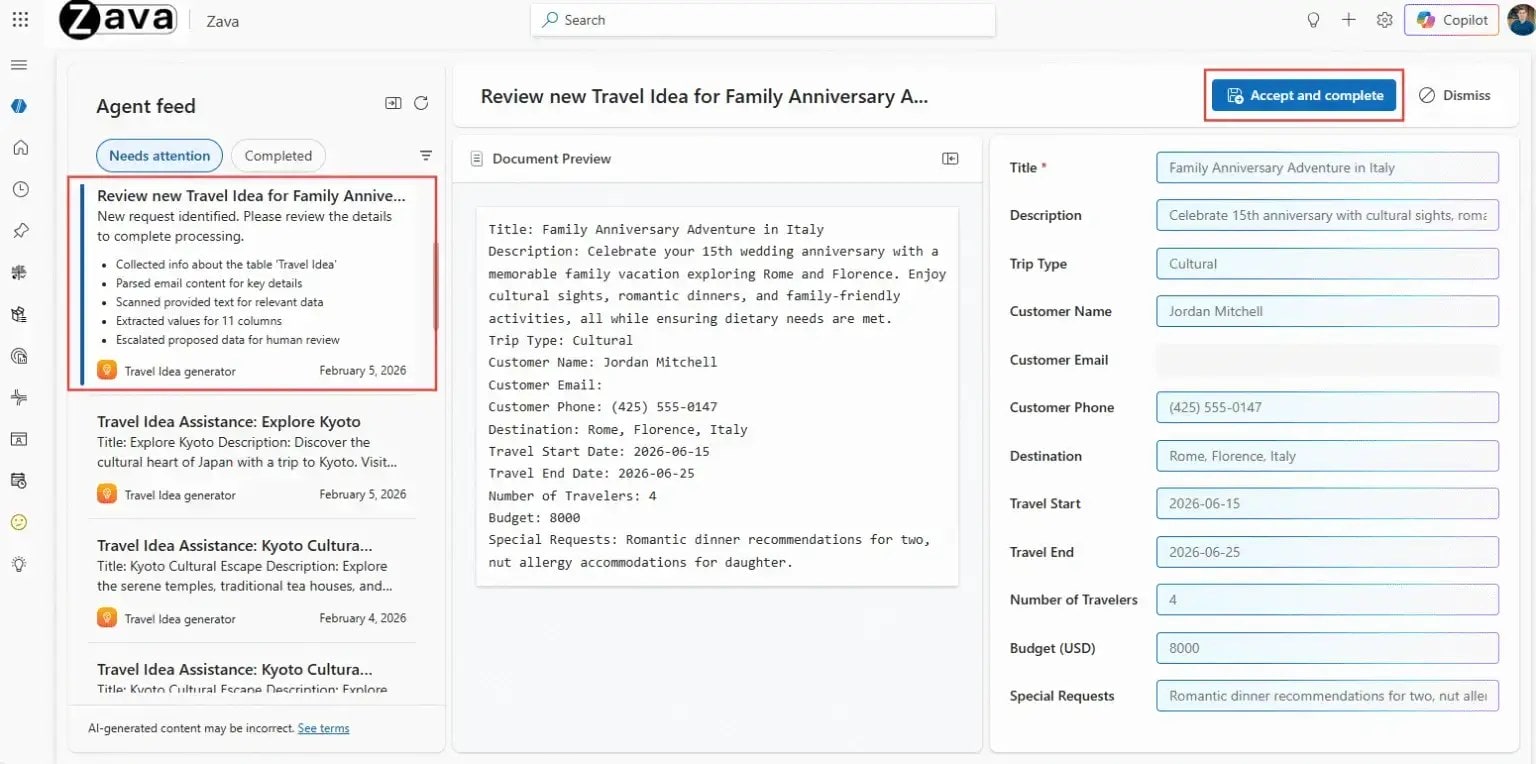
Power Apps MCP allows AI assistants—especially those built on Azure AI and Copilot—to treat app capabilities as tools, starting with structured data entry. Agents can parse unstructured input, fill out forms in the same way users do, create new records, and even flag items for human review or action instead of silently committing changes.
The enhanced agent feed is where that collaboration shows up for users: it becomes a shared workspace where makers can choose exactly which tasks appear, and users can supervise and approve what agents are doing. The feed supports side‑by‑side comparison views for data entry tasks, direct navigation into app records for context, and visibility into agent performance and activity. The end goal is clear—turn existing line‑of‑business apps into “agentic apps” that keep humans firmly in control while letting AI handle repetitive work.
Building Modern Apps: New Card Control, Themes, and Fluent Confirm Dialog
For app makers, the February feature wave adds several quality‑of‑life improvements that make it easier to build modern, consistent UIs in Power Apps.
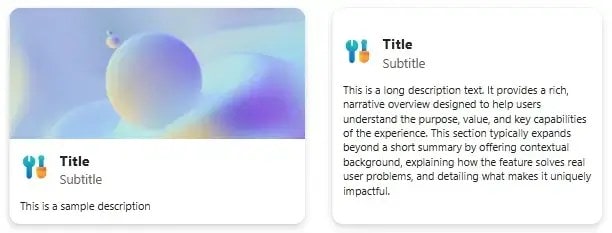
First up is a new modern Card control for canvas apps, now in public preview. This control is designed to act as a layout‑aware container that can present structured information—like summaries, tiles, or previews—without requiring makers to manually stitch together multiple classic controls. Cards automatically adapt to vertical or horizontal layouts, align with Fluent UI design principles, and scale more cleanly across different screen sizes. That makes them ideal for dashboards, list pages, and mobile‑friendly views where responsive layout matters.
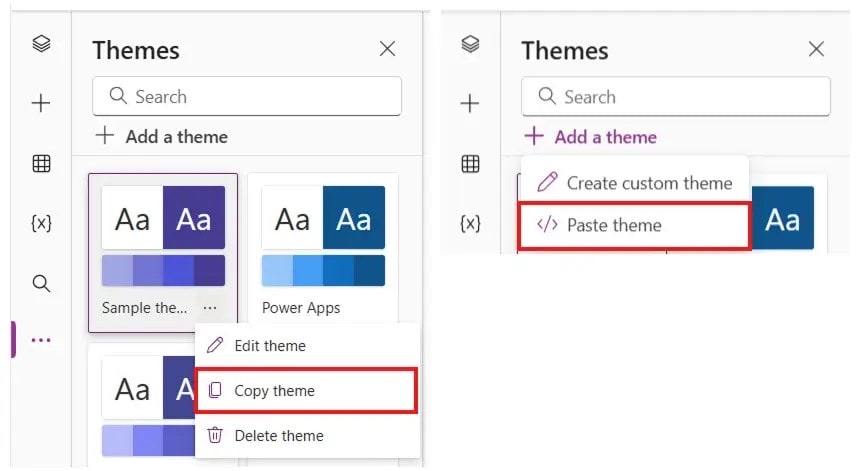
Next, Microsoft is making theme copy‑paste generally available for canvas apps. This feature lets makers copy an app’s entire theme—including colors, typography, and styling tokens—into another app as YAML, which can be edited as text if needed. Instead of re‑creating branding and design settings from scratch, teams can reuse themes across their app portfolio, helping enforce consistent visual identity while speeding up new app creation.
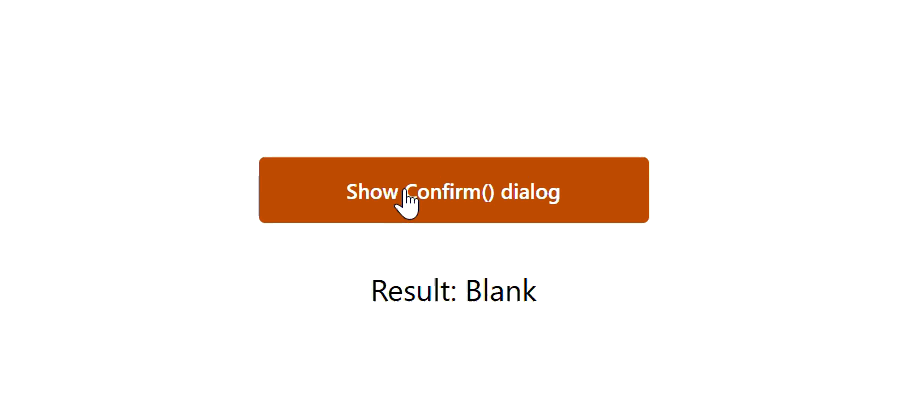
The update also brings a more modern, Fluent‑aligned confirm() function experience for canvas apps. When using modern controls, confirm() now renders as a Fluent dialog modal that respects the current app theme and provides clear confirm/cancel actions, plus a dismissal path that returns blank when users click outside the dialog. This small change helps makers build UX patterns that feel more native and polished without relying on browser‑default dialogs.
Managed Platform: Moving Apps Out of the Default Environment
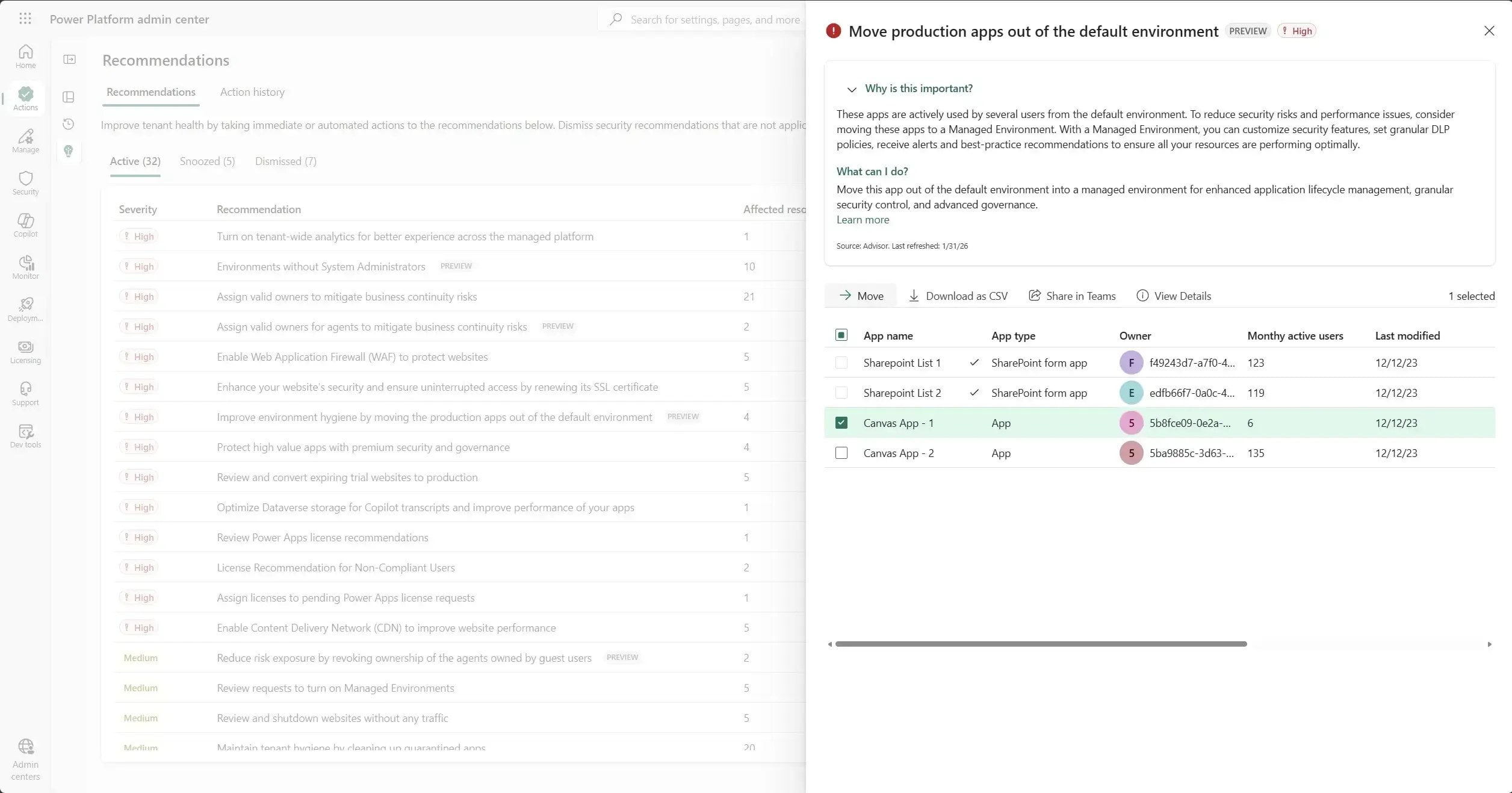
On the governance side, Microsoft is finally tackling one of the biggest pain points for Power Platform admins: the overloaded default environment. Over time, that default space tends to accumulate experimental apps, custom SharePoint forms, and one‑off solutions, which makes it harder to maintain security policies, track ownership, and enforce data loss prevention (DLP) rules.
The February update introduces a public preview recommendation in Power Platform Advisor that helps admins move certain canvas apps and custom SharePoint forms out of the default environment into designated managed environments. From the Recommendations page in the Power Platform admin center, admins can:
-
See a list of eligible canvas apps and SharePoint forms that don’t rely on unsupported shared connectors or resources.
-
Use a guided experience to select a destination managed environment and configure what happens to the original app—keep it, quarantine it, or delete it.
-
Optionally automate migration scenarios using the Power Platform for Admin v2 connector, rather than handling every move manually.
Microsoft explains on Learn that this feature is designed to “implement effective governance and DLP controls and establish clearer boundaries for app development,” giving admins a practical tool to declutter the default environment and move production‑grade apps into better‑controlled spaces.
Code Apps in Power Apps Now Generally Available

One of the most strategic announcements in this update is that code apps in Power Apps are now generally available. This feature targets professional developers who want full control over their web app stack while still benefiting from Power Platform’s governance and deployment model.
With code apps, developers can build using popular frameworks like React, Vue, and others in their preferred code‑first IDE, then deploy those apps into Power Apps as first‑class, governed assets. Once deployed, a code app becomes subject to the same enterprise‑grade guardrails—security, environment management, analytics, and DLP—that organizations already apply to low‑code apps.
Microsoft positions code apps as a bridge between AI‑accelerated/code‑generated development and IT’s need for control. Teams can move faster using modern web tooling, while IT gains central visibility over an expanding app landscape instead of dealing with shadow IT or scattered custom web apps hosted elsewhere.
Admin Upgrades: Routing, Capacity, and Copilot Adoption
Beyond the headline features, the February 2026 update ships a long list of admin‑focused improvements across Power Platform governance and analytics. The “Power Platform administration” section of the update calls out several notable additions and updates, including:
-
Environment routing, which gives organizations more control over where new apps and workloads land, aligning them with specific managed environments and policies.
-
Manage Copilot Studio credits and capacity, providing more granular ways to track and scale AI capacity used by Copilot Studio agents and bots.
-
Dataverse capacity‑based storage details, giving admins clearer insight into how database, file, and log capacity is being consumed across apps and environments.
-
Track, manage, and scale Copilot adoption in the Power Platform, so admins can see where Copilot features are being used and adjust licensing, guidance, or security policies accordingly.
These changes continue Microsoft’s trend of turning Power Platform into a managed, analytics‑backed application platform, not just a collection of low‑code tools. For enterprises rolling out Copilot features across multiple business units, the new controls help keep usage sustainable, secure, and predictable from a cost perspective.
Why This Update Matters for IT and Makers
The February 2026 Power Platform feature update is notable because it pushes forward on three fronts at once: AI inside apps, modern app building, and serious governance. MCP and the enhanced agent feed elevate Copilot and AI agents from simple chat tools to supervised collaborators embedded in day‑to‑day business workflows. The new Card control, theme reuse, and Fluent‑style confirm dialogs help makers ship cleaner, more consistent experiences faster. And the governance features—especially moving apps out of the default environment and strengthening admin analytics—give IT a clearer path to scale Power Platform responsibly.
For organizations already invested in Power Apps, Power Automate, and Power Pages, this month’s update is a strong signal that Microsoft is doubling down on Power Platform as the place where AI, low‑code, and code‑first development converge, under the guardrails enterprise IT needs.
Discover more from Microsoft News Now
Subscribe to get the latest posts sent to your email.
