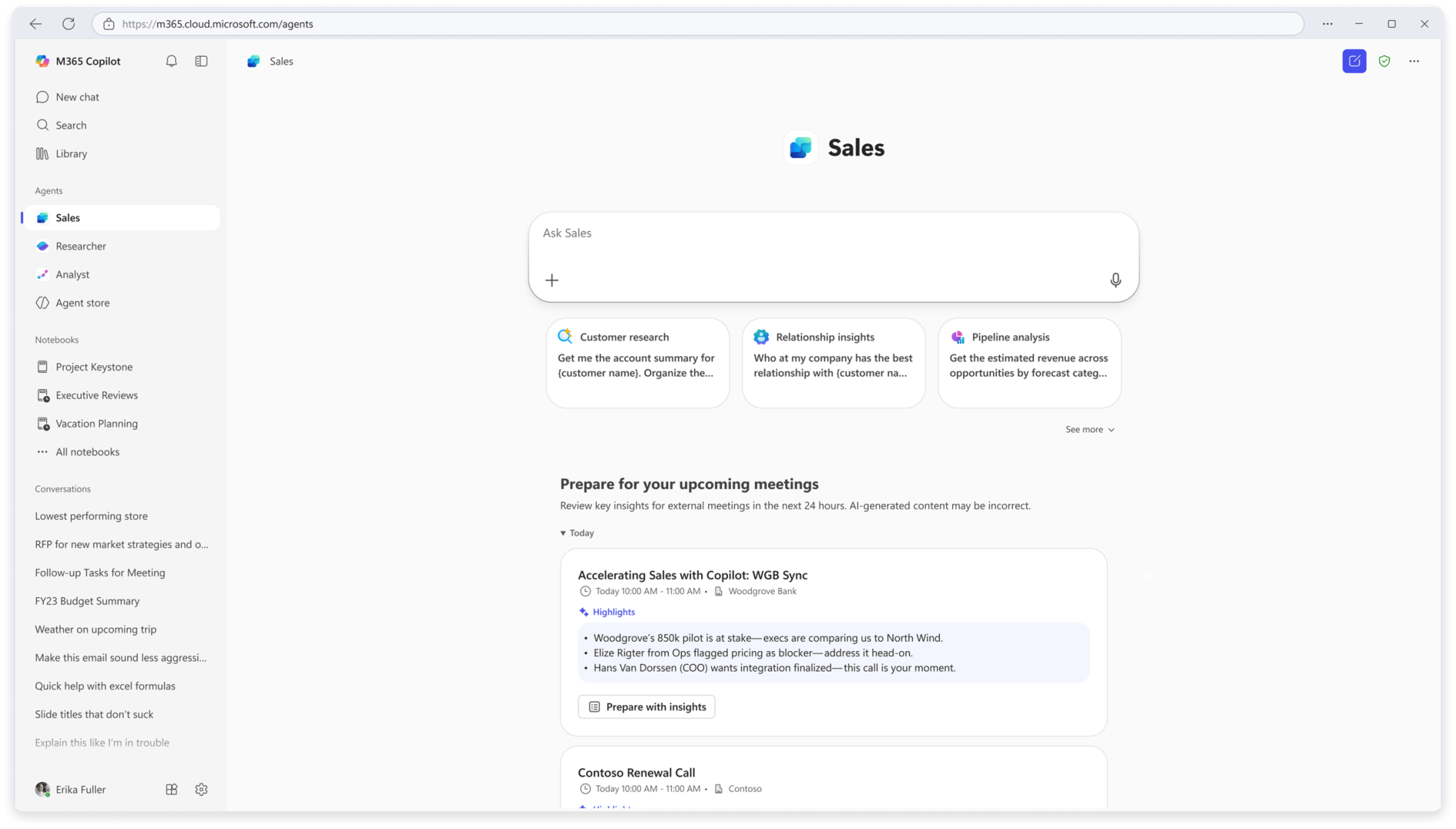

Microsoft has officially launched Sales agent in Microsoft 365 Copilot, now available in public preview. This new AI-powered feature is built to help sales teams better prepare for customer meetings, understand accounts faster, and manage pipelines with unprecedented precision.
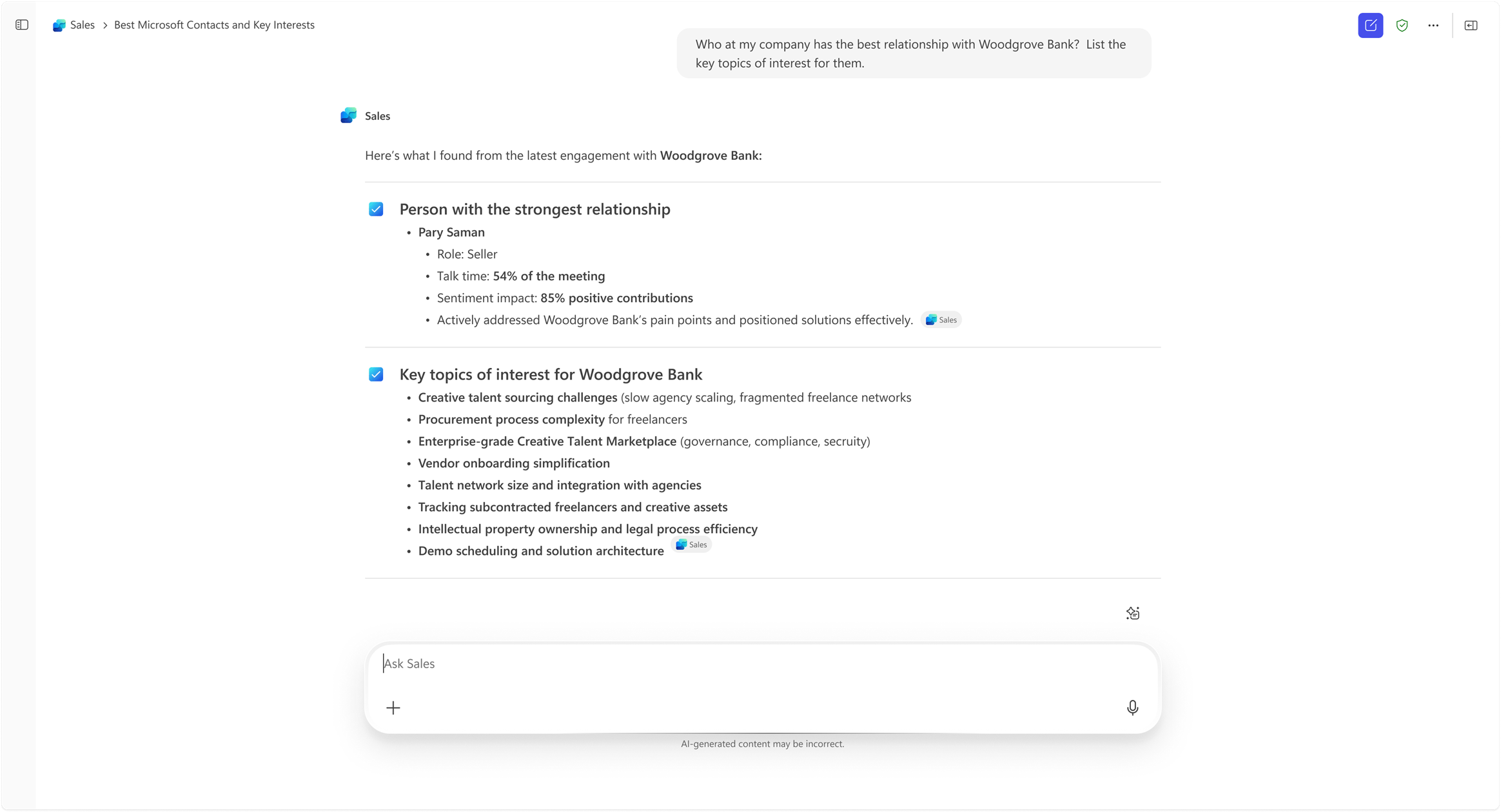
Described as “the Copilot agent that speaks sales,” the Sales agent integrates deeply with CRM systems, Microsoft 365 data, and enterprise work data such as emails, Teams meetings, and documents. Whether a team uses Dynamics 365 Sales or Salesforce, this new Copilot experience eliminates endless data-hunting across multiple systems—replacing it with natural conversation and actionable insights.
“Sales agent empowers sellers to prepare and act confidently,” says Microsoft’s Bharath Varadarajan in a technical blog post detailing its architecture and evaluation results. “It unifies enterprise CRM data and work signals, allowing sellers to focus on building relationships instead of searching for information.”
The Technology Behind Sales Agent: How It Works
At the heart of Sales agent lies a unified, modular architecture designed to deliver reliable AI-driven insights across sales workflows. Microsoft built the system around a unified, agentic back-end that processes emails, meetings, CRM data, and public information to create contextual intelligence within Microsoft 365 apps.
Key architectural components include:
-
Autonomous agents: These run in the background, analyzing CRM, meetings, and emails to surface relevant insights automatically.
-
CRM record mapping: All intelligence generated is tied back to CRM records—ensuring accuracy, groundedness, and traceability.
-
Sales-specific intelligence: Proprietary, sales-optimized system instructions improve relevance and reduce the need for custom prompts.
-
Unified data access layer: Integrated with enterprise-grade authentication and access control, guaranteeing that all processing remains compliant and secure.
Unlike general-purpose AI models, Sales agent’s responses are always contextual, personalized, and grounded in verified organizational data. This means that when a seller asks, “What were the key topics discussed with Contoso last quarter?”, their response is backed by CRM insights, emails, and Teams transcripts—accurate to the record.
Seamless Integration Across Microsoft 365
Sales agent’s design allows it to slot directly into Microsoft 365 apps, such as Outlook, Teams, Excel, and Word.
In Chat Experiences:
Sellers can ask natural language questions such as:
-
“Summarize the last three meetings with Client A.”
-
“Show open opportunities in the healthcare industry.”
Sales agent automatically retrieves the right insights from Dynamics 365, Salesforce, and M365 signals—then composes a structured, concise response, grounded in CRM context.
In Guided Experiences:
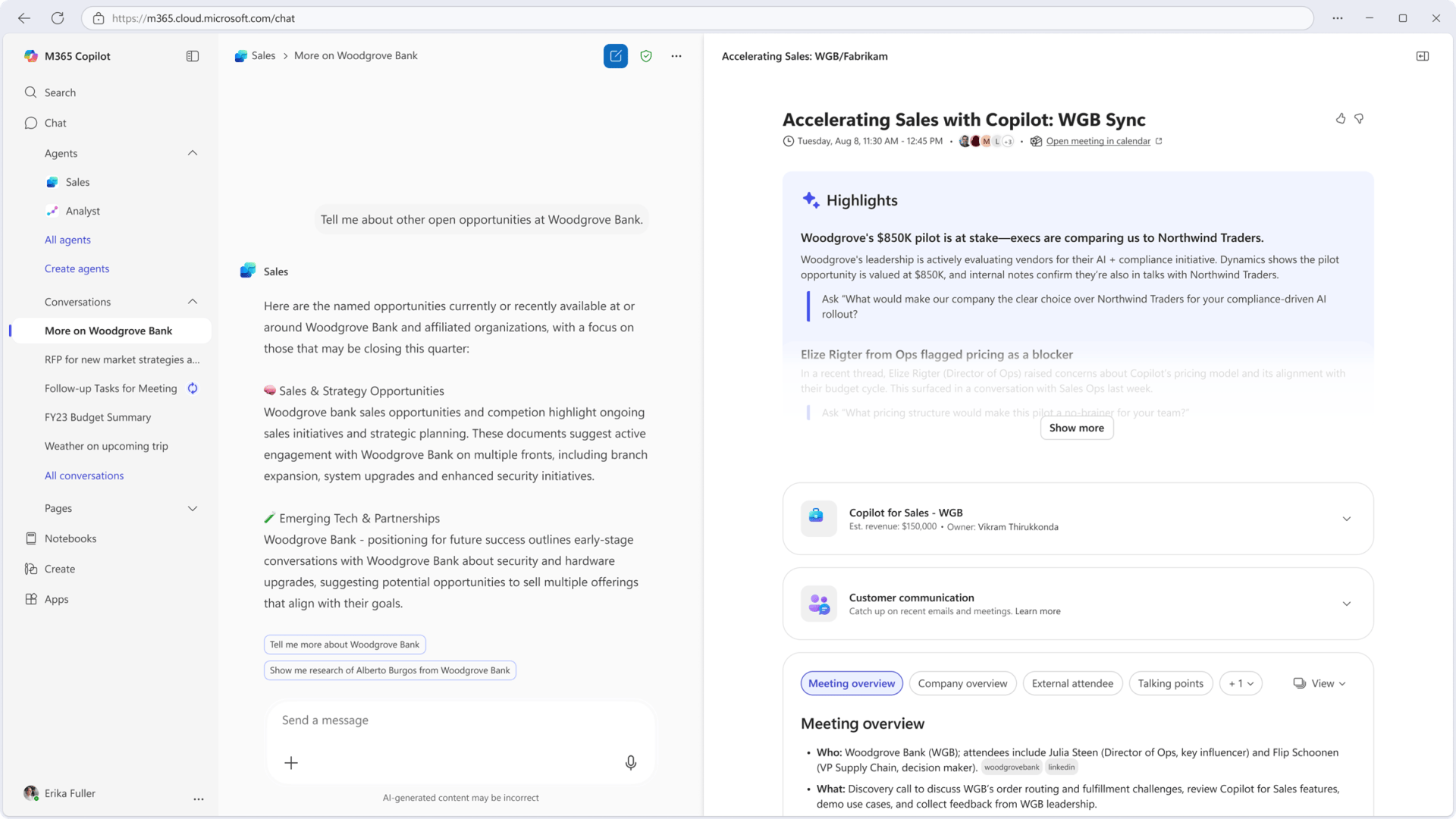
Beyond chat, Sales agent also powers guided task flows embedded in Copilot. For instance, users can generate meeting briefs, review customer sentiment, identify next steps, and even export pipeline summaries to Excel without crafting any prompts.
This combination of conversational intelligence and workflow integration gives sellers an advantage: quick answers, consistent accuracy, and a smoother prep-to-meeting transition.
The Microsoft Sales Bench: Evaluating AI in Sales
To prove that this wasn’t another “AI assistant hype,” Microsoft launched a set of benchmarks called the Microsoft Sales Bench. It’s a rigorous evaluation framework designed to measure how well AI-powered sales systems perform in real-world scenarios.
The Sales Bench includes:
-
Microsoft Sales Qualification Bench – Tests how AI agents qualify leads and generate pipeline.
-
Microsoft Sales Agent Bench – Measures effectiveness in helping sellers learn accounts, prep for meetings, and review pipelines.
The evaluation used a synthetic yet realistic CRM environment, complete with customer hierarchies, opportunities, emails, and Teams meeting transcripts. Over 547 real seller-type queries were tested, comparing the Sales agent directly against ChatGPT (GPT-5) under controlled conditions.
How Sales Agent Beats ChatGPT
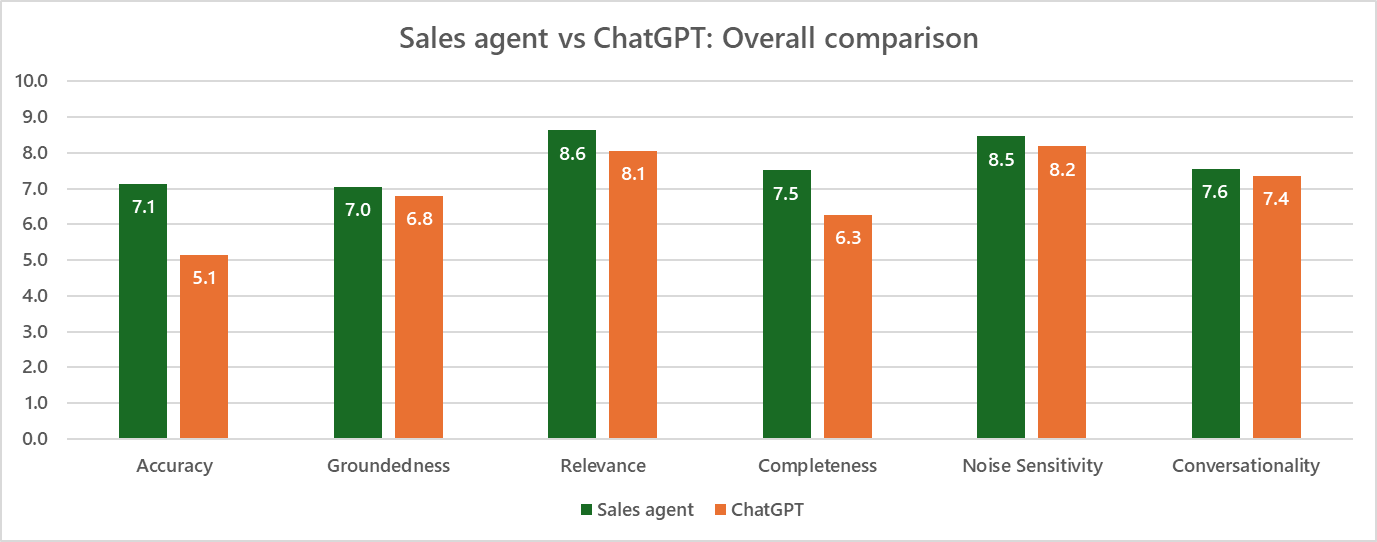
Microsoft’s internal tests showed clear results: when averaged across all prompts, Sales agent consistently outperformed ChatGPT on accuracy, completeness, and contextual relevance.
Here’s why:
-
Sales agent has CRM grounding, allowing it to understand account hierarchies, opportunities, and customer touchpoints.
-
Integrated data sources from Dynamics, Teams, and Outlook give it access to real-time enterprise context.
-
It can reason over both structured CRM data and unstructured meeting transcripts, which ChatGPT lacked due to data access limitations.
In quantitative terms, Sales agent outscored ChatGPT in the three key seller productivity dimensions that matter most:
-
Accuracy – No hallucinated facts, only verified CRM insights.
-
Relevance – Responses stay focused on customer context.
-
Completeness – Full coverage of multi-touch account information.
This result aligns with Microsoft’s internal trial involving 19 sales representatives who reported that Sales agent cut down meeting prep time by over 1.7 hours per week while improving confidence in client interactions.
User Feedback: Real Sales Impact
Early pilot feedback from Microsoft’s own sales teams has been overwhelmingly positive:
“Loving the tool. My whole team wants it rolled out immediately.” — Director, Digital Sales
“I can create a customer-ready perspective in seconds before meetings. You can’t put a price tag on that.” — Director, Digital Specialist
By aggregating data from across Microsoft 365 and CRM systems, Sales agent enables sellers to:
-
Prepare faster for meetings with AI-generated briefs.
-
Close more deals by identifying pipeline risk earlier.
-
Find connections and relevant internal documents on-the-fly.
How to Get Started with Sales Agent in Microsoft 365 Copilot
If you’re ready to bring this next-generation AI experience into your sales stack, here’s how to get started.
Step 1: Verify Licensing and Permissions
Sales agent is currently in public preview. It’s available for organizations with Microsoft 365 Copilot licenses and compatible CRM systems such as Dynamics 365 Sales or Salesforce. Admins should ensure the right CRM connectors are configured for secure data access.
Step 2: Set Up Sales Agent
Microsoft has detailed documentation to guide deployment:
-
Set up Sales agent in Microsoft 365 Copilot (preview)
Setup involves enabling the feature within the Microsoft 365 admin center and connecting CRM data through Microsoft Graph connectors.
Step 3: Learn the Interface
Once enabled, Sales agent appears as a Copilot chat and guided experience inside Teams, Outlook, or Dynamics 365. Sellers simply use natural language to query:
“Show me all current opportunities in the consulting vertical.”
“Prepare a meeting brief for Contoso tomorrow.”
Step 4: Use Sales Agent for Meeting Prep
Refer to Microsoft’s guide:
-
Prepare for your sales meetings in Microsoft 365 Copilot (preview)
Sales agent automatically compiles information such as: -
Meeting history and notes
-
Follow-up items
-
Customer sentiment trends
-
Active deals and contacts
Step 5: Review and Coach with Pipeline Insights

Sales agent provides deal coaching summaries, suggesting where effort should be focused based on engagement levels and sentiment. These analytical capabilities turn Copilot from a passive assistant into a proactive deal advisor.
Why It Matters for Modern Selling
Microsoft’s Sales agent is more than just another Copilot feature—it’s a redefinition of AI-assisted selling workflows. It replaces disconnected research and manual prep with a seamless, conversational experience grounded in enterprise context.
See also: How to Access GPT‑5.2 in Microsoft 365 Copilot Chat (Boost Quick Response vs Smarter Think Deeper)
By combining CRM integration, Microsoft 365 data fusion, and grounded LLM intelligence, the Sales agent establishes Microsoft’s vision for trustworthy, workflow-native AI. It’s an assistant that not only talks sales—but truly understands it.
Discover more from Microsoft News Now
Subscribe to get the latest posts sent to your email.
