
The latest Windows 11 Beta build is a focused refinement build that lines it up more closely with today’s Dev Channel release, especially around Settings and the context menu. While the Dev build goes further with reliability fixes and an upgraded Paint experience, the new Windows 11 Beta build keeps things lean, stable, and closer to what regular users will eventually see.
Windows 11 25H2 Beta gets UI and Settings polish
Microsoft has released Windows 11 Insider Preview Build 26220.7872 (KB5077231) to the Beta Channel, continuing the Windows 11 version 25H2 development via an enablement package. As with other recent Insider releases, changes are split into features and improvements that roll out first to those with the “get the latest updates as they are available” toggle enabled in Settings > Windows Update, and then more broadly to all Beta Channel users over time.
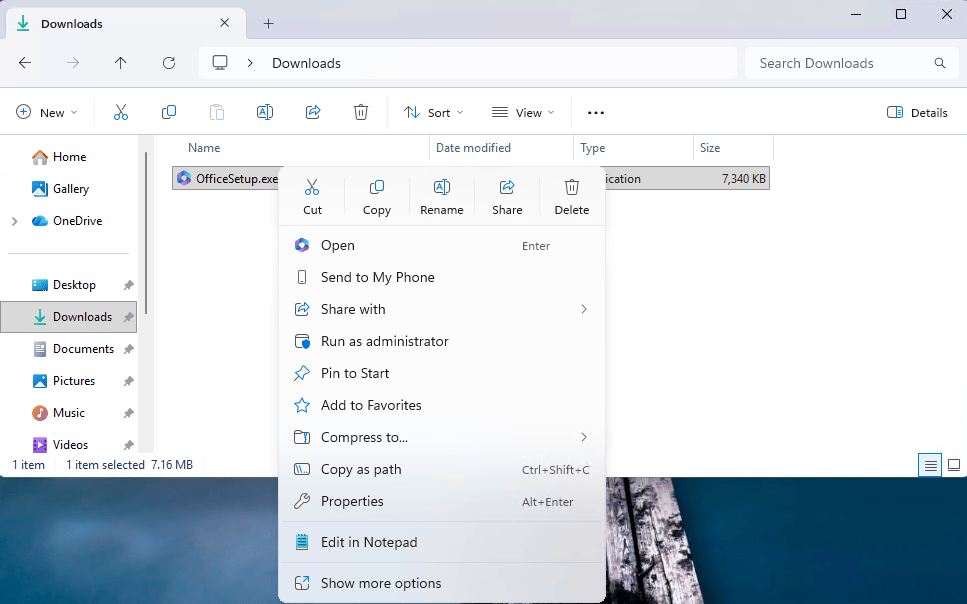
One of the most visible tweaks in this build is a small but welcome refinement to the context menu. When you right‑click an .exe, .bat, or .cmd file, the “Open” item in the context menu now shows an icon that matches the default app associated with that file type. It’s a subtle touch, but it makes it clearer which app will actually open your executable or script and brings the context menu visuals in line with your default app choices.
Refined Device info card and About page
The Windows 11 Beta build continues Microsoft’s work on the “Device info” card on the Settings Home page, which first appeared in Windows Insider Program channels back in June 2025. The card has been refined based on early learnings to simplify key device specifications and improve consistency from the Home card through to Settings > System > About, so your core hardware details are easier to scan and understand at a glance. This consumer‑focused version of the card is rolling out to Insiders in the United States, while a separate variant remains available for enterprise users on IT‑managed devices.
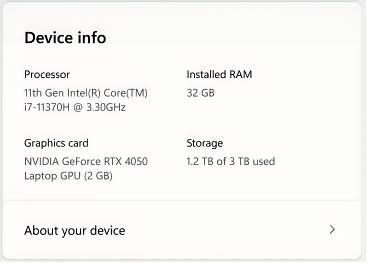
Inside Settings > System > About, this build once again elevates key device hardware details to the top of the page, responding directly to Insider feedback. The updated Device information section now pulls together additional details like graphics and storage into one place and adds easy copy/paste support so you can quickly share your specs for support, troubleshooting, or resale. Device‑related FAQs are not currently shown as Microsoft continues to experiment with better ways of delivering contextual help within Settings.
Taskbar animation tuning
On the desktop side, Build 26220.7872 makes another small but user‑visible improvement to the taskbar. Microsoft has refined the animations that appear when you move your mouse over app groups on the taskbar, aiming for smoother, more polished hover behavior. It’s one of those changes you might not consciously notice, but over time it contributes to a more responsive and cohesive feel when multitasking between multiple app windows.
How today’s Beta build differs from today’s Dev build
Although today’s Beta and Dev Channel releases share several core ideas—like the updated context menu behavior and the refined Device info card—they don’t include the exact same feature set. The Beta build 26220.7872 focuses on:
-
Context menu “Open” icon alignment with the default app for .exe, .bat, and .cmd files.
-
The updated Device info card on Settings Home and the reworked System > About layout.
-
Improved animations for mousing over app groups on the taskbar.
By contrast, today’s Dev Channel Build 26300.7877 adds several extras on top of that:
-
Improved reliability of showing app icons in the system tray when the taskbar is set to auto‑hide.[
-
A fix for a File Explorer issue where open windows and tabs could unexpectedly jump to Desktop or Home.
-
Better reliability when sending larger files via Nearby Sharing.
-
A Paint app update (version 11.2601.391.0) introducing freeform rotate for shapes, text, and selections, including a custom angle option.
In short, the Windows 11 Beta build delivers a trimmed‑down, more conservative snapshot of Windows 11 25H2, while the Dev build continues to experiment with reliability improvements and app‑level enhancements like the new Paint features. Beta remains closer to what mainstream users are likely to get, whereas Dev stays one step ahead with changes that may still shift based on Insider feedback.
Recent Posts You Might Like
- Windows 11 Dev Build 26300.7877 Delivers Impressive Polishes to Settings, Taskbar, File Explorer, and Paint Freeform Rotate
- Windows 11 Canary Build 28020.1619 Brings Cross‑Device Resume Boost, Narrator Upgrades, and Paint Freeform Rotate
- Microsoft and CrowdStrike Let Azure Customers Use Existing MACC to Buy CrowdStrike Falcon Security Right Now
Discover more from Microsoft News Now
Subscribe to get the latest posts sent to your email.
