

Microsoft has released KB5077223 to testers in the Beta Channel, continuing the rollout of Windows 11 version 25H2 through an enablement package. Announced in a new Windows Insider blog post, this Windows 11 Insider Beta build focuses on one small Microsoft 365‑related feature plus a set of reliability improvements that should make day‑to‑day use smoother for Insiders who live in the Beta ring.
Microsoft stresses that changes in the Beta Channel are split into two buckets: features and fixes that are gradually rolled out to Insiders who turn on the toggle to “get the latest updates as they are available,” and features that eventually go to everyone in the channel once they’re ready. Build 26220.7859 follows that playbook, with the headline feature only visible for some users at first while broader reliability work lands under the hood.
The build is delivered on top of Windows 11, version 25H2 via an enablement package, which means most of the underlying bits are already present on devices and the update acts more like a “feature unlock” than a full OS upgrade. That approach keeps install time short while letting Microsoft drip‑feed new experiences as they mature.
Windows 11 Insider Beta Build New feature: Microsoft 365 upgrade prompt in Settings
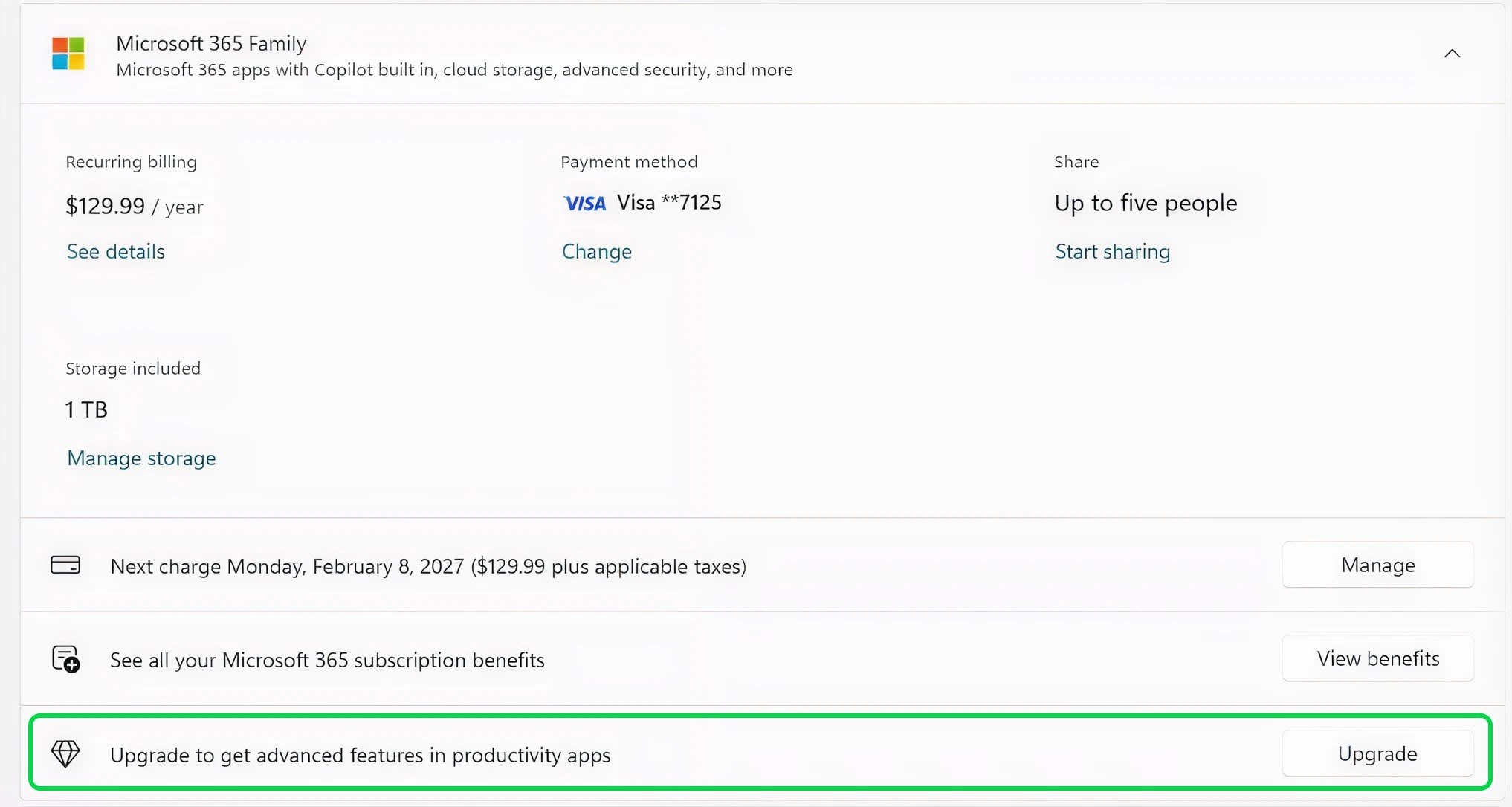
The only clearly visible new feature in this flight is aimed at Microsoft 365 Family subscribers. On the Accounts page within the Settings app, some users will now see an option to upgrade to a different Microsoft 365 plan, presented as a call‑to‑action that highlights additional benefits available on higher tiers.
If you’d rather not see subscription upsell prompts in your system settings, Microsoft notes that you can remove this upgrade suggestion by turning off “suggested content” in Settings. The company is explicitly asking Insiders to share feedback about the new Accounts experience via the Feedback Hub under Settings > Settings Homepage, which suggests this UI treatment may change based on how testers react.
Because this feature is behind the “get the latest updates as they are available” toggle, it may not appear on every Insider device right away. Microsoft is leaning heavily on its Controlled Feature Rollout technology here, enabling the prompt for a subset of Beta Channel users first and gradually expanding as it monitors telemetry and feedback.
Reliability improvements: taskbar, File Explorer, Nearby Sharing, Settings
Beyond the subscription prompt, Build 26220.7859 ships with a small but meaningful set of reliability fixes that target some long‑standing annoyances in recent Windows 11 preview builds.
1. Taskbar and system tray
Microsoft says it has improved the reliability of showing app icons in the system tray when the taskbar is set to autohide. In earlier builds, some Insiders reported that icons would intermittently fail to appear when the taskbar slid into view, making it harder to keep track of background apps and quick‑access controls. This build aims to smooth out that experience so the system tray behaves more predictably for users who prefer a cleaner, auto‑hiding taskbar.
2. File Explorer focus bug
A particularly frustrating File Explorer quirk is also getting attention. The build addresses an issue where all open File Explorer windows and tabs could suddenly jump to the Desktop or Home view, interrupting whatever folder or tab setup a user had arranged. For power users who keep multiple Explorer windows open for workflows like file management, development, or media editing, this fix should reduce unexpected context switches.
3. Nearby Sharing for large files
Nearby Sharing, Microsoft’s built‑in tool for quickly sending files to nearby devices, has also received some reliability work. Build 26220.7859 improves the reliability of sending larger files, which should cut down on failed transfers or stalled progress bars when sharing big media files or project folders between PCs. For anyone using Windows devices in the same home or office, this makes Nearby Sharing a more dependable alternative to cloud uploads or USB drives in day‑to‑day use.
4. Settings > Bluetooth & Devices > Wheel
Finally, Microsoft has improved reliability when configuring options under Settings > Bluetooth & Devices > Wheel. This section covers devices like Surface Dial and similar wheel‑based peripherals used by creators and professionals for fine‑grained control in apps. The update should reduce configuration glitches for users who customize wheel behavior or map gestures for different workloads.
All of these changes are labeled as improvements gradually rolling out to Insiders who have turned on the “latest updates” toggle, meaning some devices may receive them slightly ahead of others in the same channel. Over time, Microsoft plans to expand the rollout so all Beta Channel users benefit from the fixes.
Built on Windows 11 version 25H2 with enablement package
As with recent Beta Channel flights, Build 26220.7859 is based on Windows 11, version 25H2 and delivered via an enablement package. Windows 11 versions 24H2 and 25H2 share a common core operating system and identical system files, with the 25H2 features already present but dormant in current 24H2 installations.
The enablement package acts as a small “master switch” that turns on those 25H2 capabilities, allowing PCs to move from 24H2 to 25H2 with a single restart instead of a full in‑place upgrade. For devices that get updates directly from Windows Update or WSUS, the enablement package is automatically delivered as part of the feature update to Windows 11, version 25H2.
This model lets Microsoft ship incremental improvements—like the ones in KB5077223—on top of a common codebase while experimenting with new experiences through Controlled Feature Rollout. It also means that many of the changes Insiders see in Beta are effectively previews of what will eventually arrive for mainstream Windows 11 users when the 2025 Update (25H2) ships broadly.
Controlled Feature Rollout and the “latest updates” toggle
The blog post once again highlights how Microsoft is using Controlled Feature Rollout (CFR) technology to manage new features in the Insider rings. Many experiences in the Beta Channel now appear first for a small subset of users before being expanded more widely, with CFR acting as the gating mechanism that controls who gets what and when.
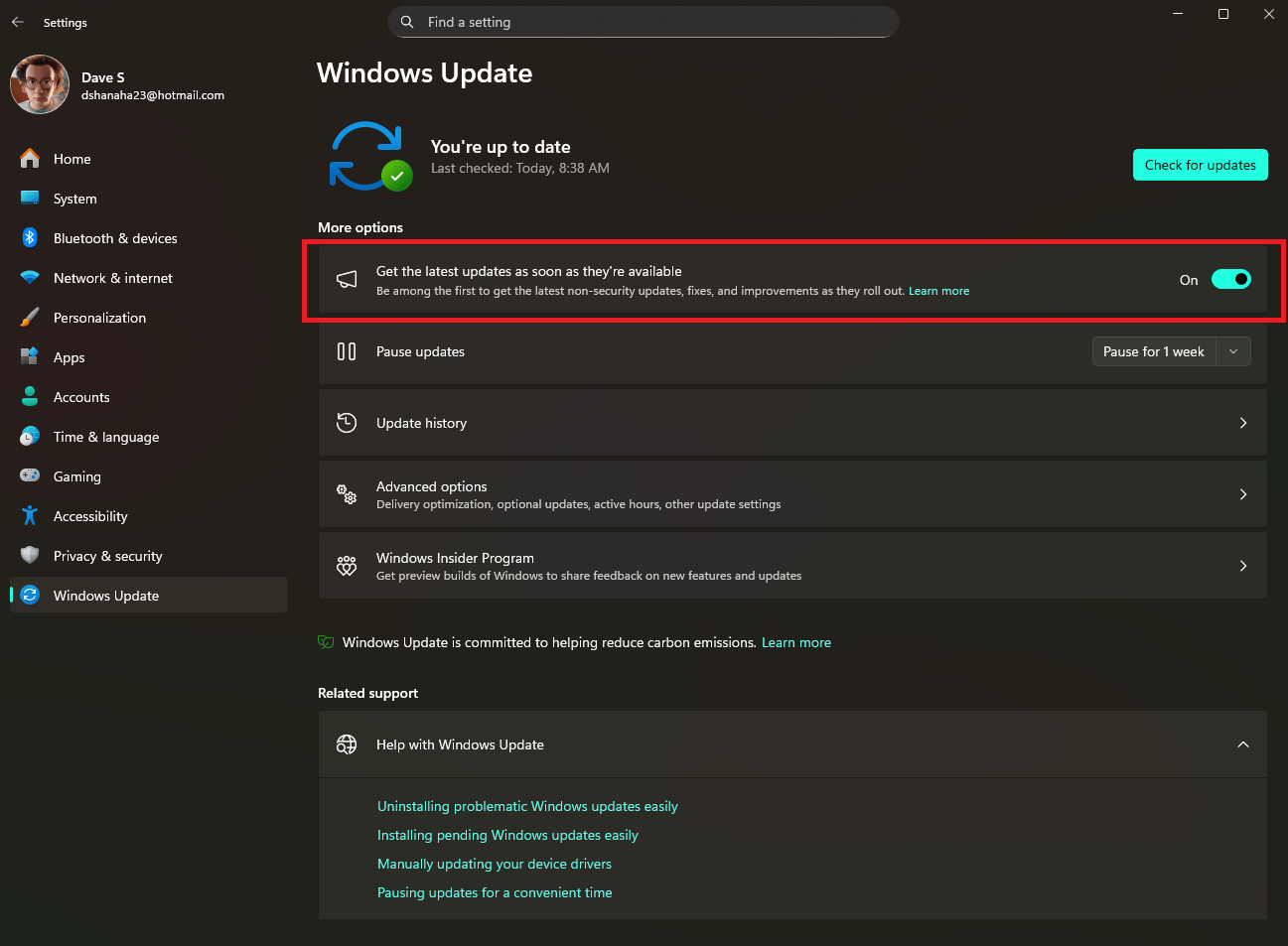
If you’re an Insider who wants to be at the front of that rollout queue, the company recommends turning on the “Get the latest updates as they are available” toggle in Settings > Windows Update. With that switch enabled, your PC becomes eligible for the earliest wave of new features and changes being tested in the channel, including things like the new Microsoft 365 upgrade prompt.
If you prefer a slightly more stable experience, you can leave the toggle off and wait for features to move into the broader rollout phase. Microsoft cautions that some features and experiments in these builds may never ship to the general public, may change significantly, or could be removed entirely based on feedback, performance, and reliability data.
The company also reminds Insiders that some in‑development features may not be fully localized yet, and asks users to report any localization issues they encounter via Feedback Hub. For testers tracking build status across channels, Microsoft points back to its Flight Hub page, which keeps an at‑a‑glance list of which build is in which Insider ring.
What Beta Channel testers should do next
For Windows 11 power users and IT enthusiasts in the Beta Channel, Build 26220.7859 is a maintenance‑heavy release rather than a headline‑grabbing feature drop, but it’s still worth taking. The combination of system tray reliability, File Explorer stability, and more dependable Nearby Sharing should reduce friction in daily workflows, especially for those who live in preview builds full‑time.
If you want to pick up the new features as quickly as possible, make sure you:
-
Are enrolled in the Windows Insider Program’s Beta Channel on your device.
-
Head to Settings > Windows Update and turn on “Get the latest updates as soon as they’re available.”

-
Check for updates and install KB5077223 (Build 26220.7859) when it appears.
Once installed, keep an eye on the Accounts page in Settings if you’re a Microsoft 365 Family subscriber, and test whether your system tray icons, File Explorer windows, Nearby Sharing transfers, and wheel settings behave more consistently than before. Microsoft is actively requesting feedback on these experiences, so logging issues or suggestions through Feedback Hub can influence what ultimately ships with Windows 11 version 25H2 when it reaches general availability.
Recent Posts You Might Like
- Xbox Insiders on PC Get Exciting New Postgame Recaps Feature in the Xbox App
- Microsoft Hits 100% Renewable Energy Match as It Accelerates Push Toward Carbon Negative by 2030
- Microsoft Global South Boldly Pledges $50 Billion To Close The AI Divide By 2030
Discover more from Microsoft News Now
Subscribe to get the latest posts sent to your email.
