
Microsoft has once again pushed the boundaries of its operating system with the release of Windows 11 Insider Preview Build 26200.5641 (KB5060824) to the Dev Channel. This build, announced by Amanda Langowski and Brandon LeBlanc on June 9, 2025, brings a host of new features, improvements, and fixes that are sure to excite both power users and everyday Windows enthusiasts. For those eager to stay ahead of the curve, this article dives deep into the most significant changes and what they mean for your Windows 11 experience.
Windows 11 Insider Preview Build 26200.5641 (Dev Channel) New Features: A Refreshed Start Menu and More
Start Menu Overhaul
One of the most noticeable changes in Build 26200.5641 is the updated Start menu. Microsoft has reimagined the Start menu’s layout to make it more intuitive and responsive, especially for users with larger screens.
-

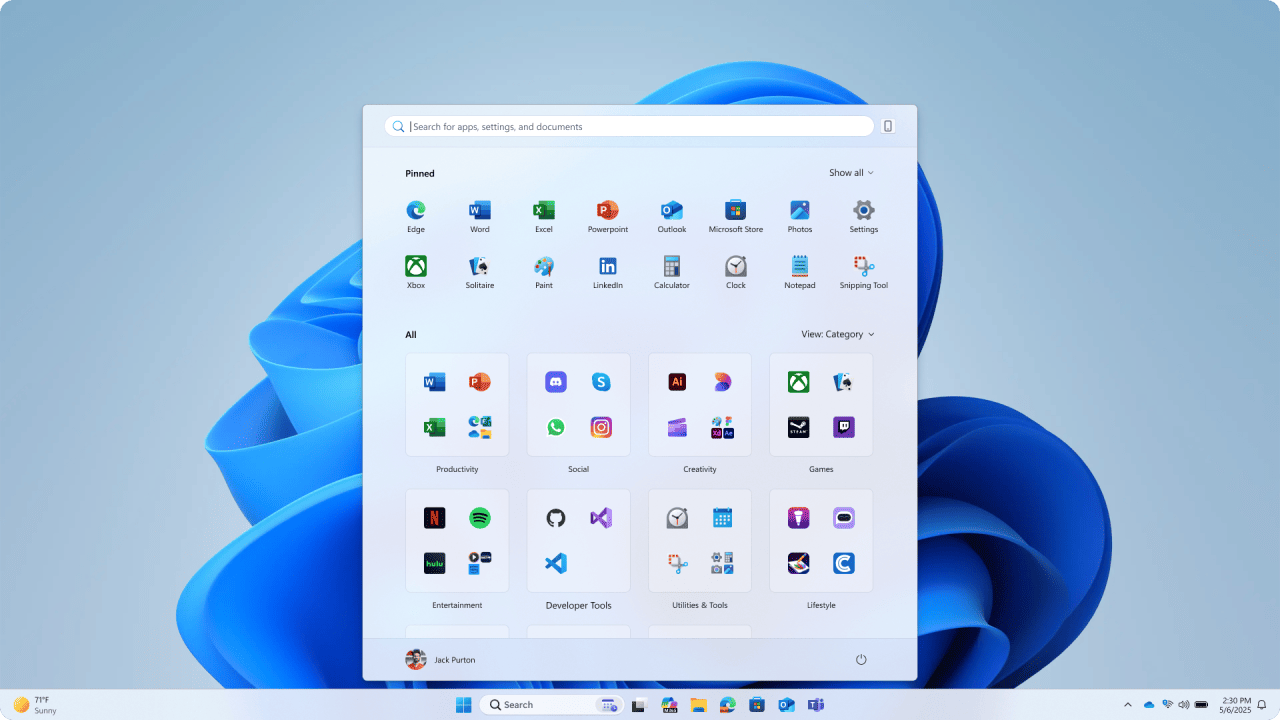
Updated Start menu shows pinned apps on the top, recommended apps and files in the middle, and installed apps which are grouped by a new category UI on the bottom. Pinned Apps on Top: The new Start menu places pinned apps at the top, followed by recommended apps and files in the middle, and installed apps grouped by a new category UI at the bottom.
-
Scrollable Design: The Start menu now supports scrolling, making it easier to access all your apps without navigating to a secondary page. The “All” section is now at the top level for quick access.
-
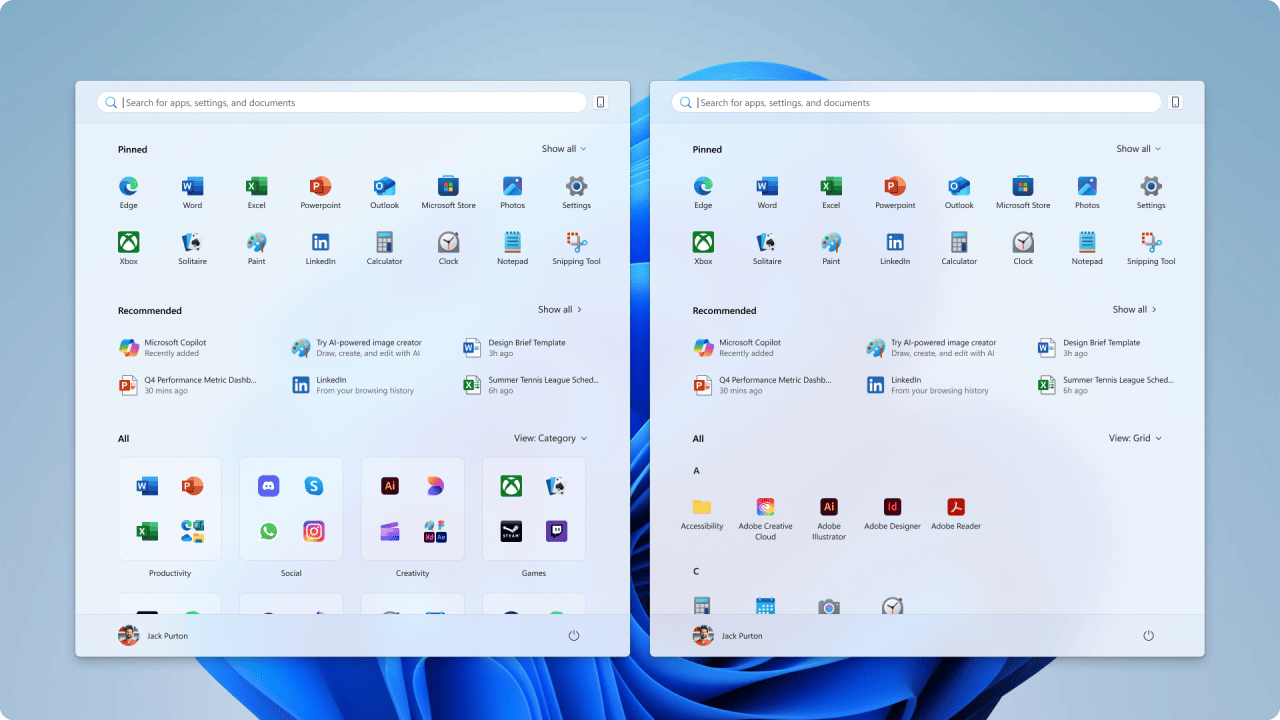
Updated Start menu introduces 2 new ways to view installed apps: by category and grid views. Category and Grid Views: Users can now choose between two new views for the “All” section: category view (apps grouped by type) and grid view (apps listed alphabetically with more horizontal space). The last used view is remembered for convenience.
-
Responsive Layout: The Start menu dynamically adjusts its size based on your screen. Larger devices see more columns of pinned apps, recommendations, and categories, while smaller devices get a more compact layout. Sections like Pinned and Recommended can collapse or expand depending on your preferences.
Updated Start menu only shows pinned and installed apps to illustrate that sections within Start are now responsive and can collapse such as the Recommended section. -
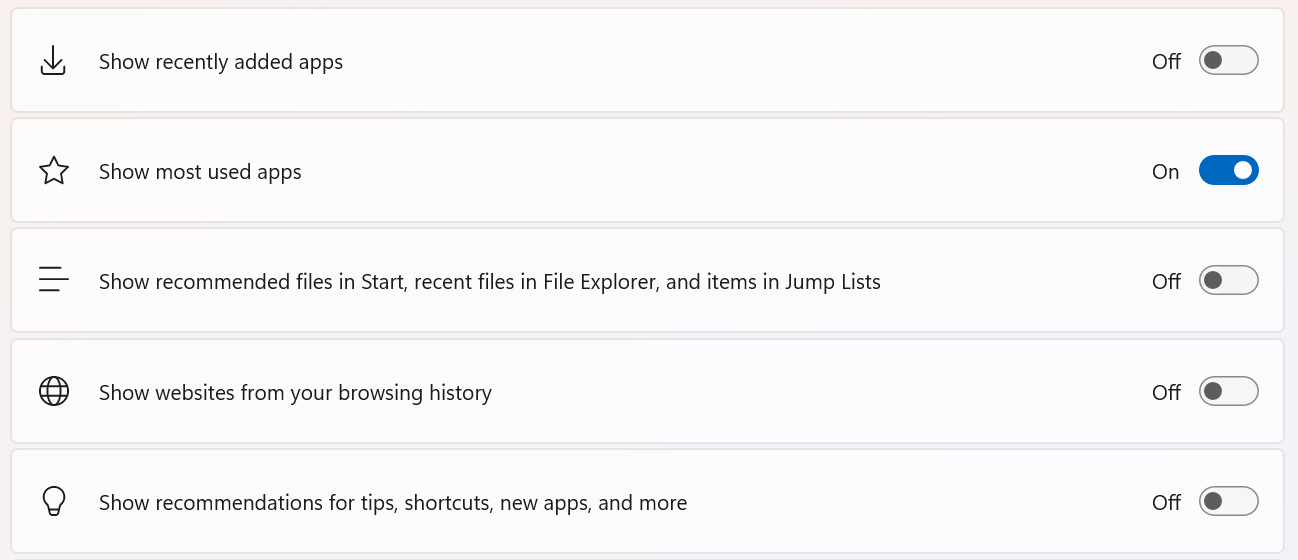
Personalization Options: Users can control what appears in the Start menu via toggles in Settings > Personalization > Start. You can turn off recommendations, recently added apps, and more.

Toggles in Settings app to turn on/off features in Start. -
Cross-Device Integration: The Start menu now features a mobile device button next to the Search box, allowing users to expand and collapse content from connected Android and iOS devices. This feature is already available in most markets and will come to the European Economic Area later in 2025.

Lock Screen Widget Customization
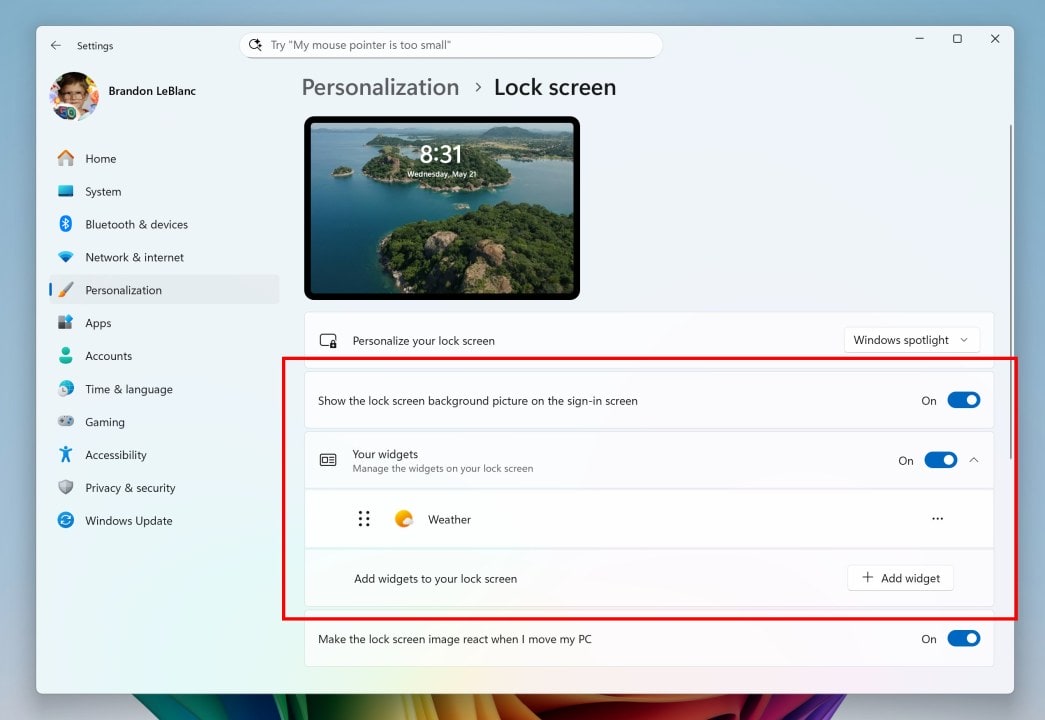
Following a successful rollout to Windows Insiders in the EEA, Microsoft is now extending lock screen widget personalization to all regions. Users can add, remove, and rearrange widgets such as Weather, Watchlist, Sports, and Traffic. Any widget that supports the small sizing option can be added to the lock screen. Customization is accessible via Settings > Personalization > Lock screen.
Narrator Screen Curtain for Enhanced Privacy
The Screen Curtain feature in Narrator is designed to protect privacy and improve focus for users who rely on screen reading. When activated, Screen Curtain completely blacks out the display, ensuring that only the user hears what’s on the screen through Narrator. This is especially useful in public or shared environments where sensitive information should remain private.
To enable Screen Curtain:
-
Turn on Narrator with Ctrl + Win + Enter.
-
Press Caps + Ctrl + C to enable Screen Curtain.
-
Use Narrator as usual.
-
Press Caps + Ctrl + C to disable Screen Curtain.
Improvements and Fixes: Streamlining the Windows Experience
Windows Search Settings Consolidation
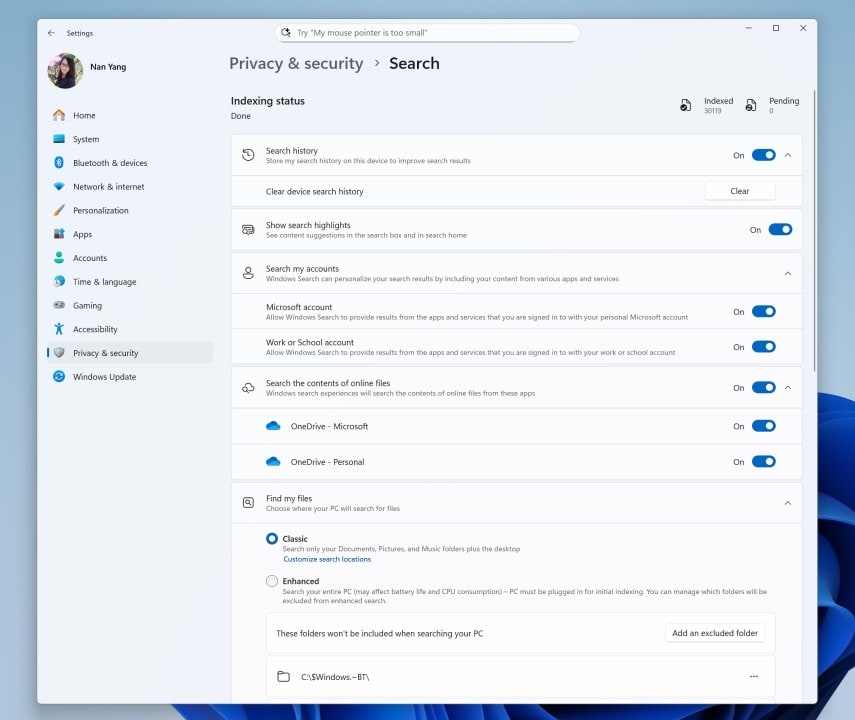
Microsoft is streamlining Windows Search settings by combining the “Search permissions” and “Searching Windows” pages into a single, modernized interface under Settings > Privacy & security > Search. This makes it easier to manage all your search preferences in one place.
Narrator Feature Discovery

Narrator now introduces a smoother way for users to discover and learn about its capabilities. When new features or changes are introduced, Narrator will guide users through them via modal windows, making it easier for both new and experienced users to stay informed.
Gamepad Layout for Touch Keyboard
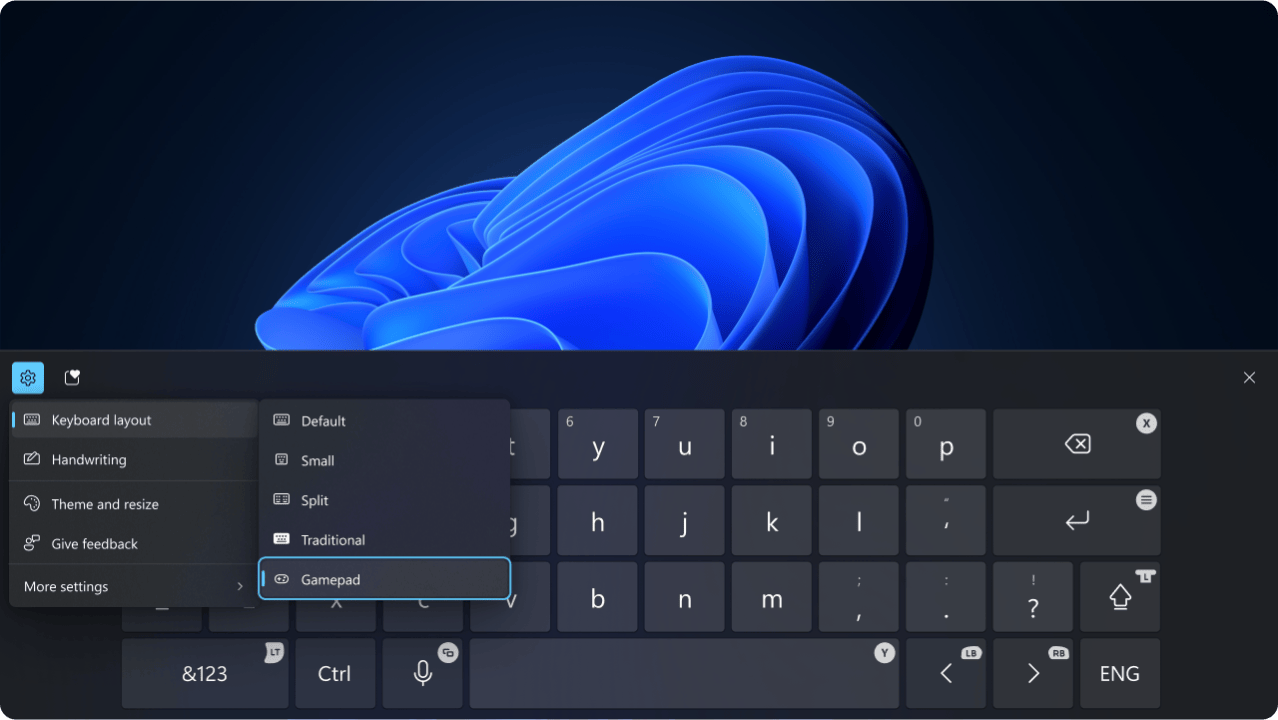
The Gamepad layout of the Windows touch keyboard has been updated with enhanced controller navigation and improved focus handling for child keys, flyout menus, word suggestions, language switching, and settings. A new Gamepad keyboard has also been designed to support PIN sign-in on the Windows lock screen, featuring controller shortcuts for quick PIN entry.

Bug Fixes: Addressing User Feedback
Microsoft has addressed a range of issues reported by Insiders in previous builds:
-
General: Fixed input issues affecting typing in Search, Chinese pinyin IME candidate window, clipboard history, and the emoji panel.
-
Recall (Preview): Fixed crashes for Recall on Copilot+ PCs.
-
Taskbar: Fixed an issue where taskbar icons appeared small despite settings configured otherwise.
-
File Explorer: Fixed an issue where restoring a File Explorer search result from Recall would not display the search string.
-
Windowing: Fixed an issue where ALT + Tab out of a full-screen game could freeze other windows.
-
Login and Lock: Fixed a lock screen crash issue.
-
Graphics: Fixed an issue causing some displays to appear green.
-
Settings: Fixed issues causing the Settings window to hang, crash during color calibration, display incorrect chevrons for Brightness, and crash when changing custom mouse cursors.
For all users in the Dev Channel, Microsoft has fixed a severe discoloration issue when connecting to older Dolby Vision displays.
Known Issues and Workarounds
Despite the many improvements, there are still some known issues in this build:
-
General: After a PC reset, the build version may incorrectly show as Build 26100. The option to reset your PC under Settings > System > Recovery will not work in this build. Some Insiders may experience repeated bugchecks with KERNEL_SECURITY_CHECK_FAILURE.
-
Windows Update: Some Insiders may experience a rollback when installing this update with error 0x80070005. Microsoft is working on a fix.
-
Start Menu: Touch navigation may not work reliably, drag and drop is limited, and duplicate entries may appear in folders.
-
Xbox Controllers: Some users may experience bugchecks when using Xbox Controllers via Bluetooth. To resolve, uninstall the XboxGameControllerDriver.inf via Device Manager.
-
Click to Do (Preview): AMD or Intel-powered Copilot+ PCs may experience long wait times for intelligent text actions after a new build or model update.
-
File Explorer: Narrator scan mode may not work properly in the Summarize AI action result canvas for Microsoft 365 files.
-
Widgets: Pinning in the new widgets board experience may revert to the previous experience until support is completed.
Reminders for Windows Insiders
-
Dev Channel Updates: Insiders receive updates based on Windows 11, version 24H2 via an enablement package (Build 26200.xxxx).
-
Feature Rollout: Many features are rolled out gradually using Control Feature Rollout technology. To get the latest updates first, turn on the toggle in Settings > Windows Update.
-
Feedback: Microsoft encourages Insiders to file feedback via Feedback Hub (WIN + F) under the relevant categories.
-
Localization: Some features may not be fully localized and will be updated over time.
-
Accessibility: Some accessibility features may not work with preview features like Recall and Click to Do.
Why These Updates Matter
This latest build demonstrates Microsoft’s commitment to refining the Windows 11 experience based on user feedback. The new Start menu, lock screen widgets, and Narrator Screen Curtain are just a few examples of how Microsoft is making Windows more intuitive, accessible, and secure. For those who rely on keyboard shortcuts and PowerToys for efficient navigation, these updates further enhance productivity and ease of use.
As Microsoft continues to iterate on Windows 11, features and experiences in these builds may change, be removed, or never be released beyond the Insider program. However, the feedback gathered from Insiders plays a crucial role in shaping the future of Windows. Whether you’re a developer, gamer, or everyday user, these updates offer a glimpse into what’s next for Windows 11.
Summary Table: Key Features and Fixes in Build 26200.5641
| Feature/Fix | Description |
|---|---|
| Start Menu | New layout, scrollable, category/grid views, responsive sections, cross-device integration |
| Lock Screen Widgets | Customizable widgets, add/remove/rearrange, available in all regions |
| Narrator Screen Curtain | Privacy feature, blacks out display, activated via keyboard shortcut |
| Windows Search | Consolidated settings page, modern UI |
| Gamepad Touch Keyboard | Enhanced controller navigation, supports PIN sign-in on lock screen |
| Bug Fixes | Input, Recall, Taskbar, File Explorer, Windowing, Login/Lock, Graphics, Settings |
| Known Issues | Build version display, PC reset, bugchecks, Xbox controllers, touch navigation, duplicates |
Stay informed, stay ahead—For more breaking Microsoft news and detailed how-to guides, stay tuned to msftnewsnow.com, your trusted source for daily Microsoft updates and insights.
Discover more from Microsoft News Now
Subscribe to get the latest posts sent to your email.
