
Microsoft just dropped the latest Windows 11 Insider Preview Build 26220.7271 (KB5070307) for Dev and Beta Channel testers, packed with powerful new tools, quality-of-life tweaks, and a major focus on enriching the PC gaming experience. For Insider testers and power users, this release is one of the most forward-looking and user-friendly updates in months, blending advanced recovery features with interface and accessibility improvements.
Xbox Full Screen Experience Debuts for PC
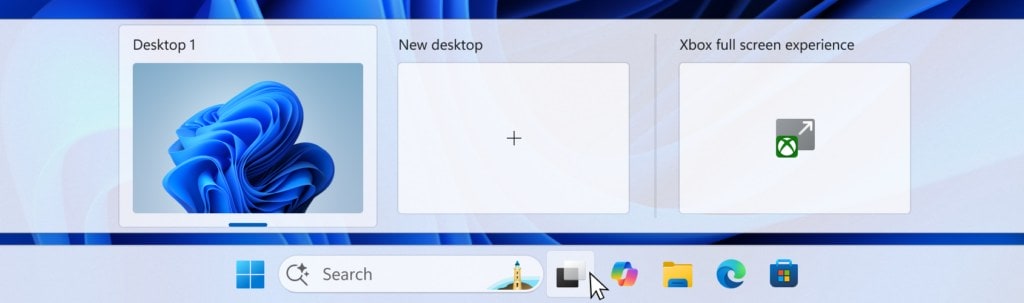
 Headlining this release, Microsoft is bringing the anticipated Xbox Full Screen Experience (FSE) to a broader PC audience. Starting today, more Windows Insiders can access the console-inspired, clean, and distraction-free interface, purpose-built for controller-first gaming scenarios. The FSE arrives not just on more Windows handhelds, but also extends to desktops, laptops, and tablets—making Xbox’s laid-back style navigation a native part of Windows 11 for those who game with controllers.

You can toggle into this overlay from Task View, Game Bar settings, or by the Win + F11 hotkey, instantly launching a clutter-free gaming dashboard. This intuitive experience is rolling out in phases: it’s available first to Windows Insiders who are also Xbox Insiders but will soon expand to all testers in the Dev & Beta Channels. Microsoft encourages enthusiasts to give feedback via the Feedback Hub, fueling further refinement ahead of a public release.
Point-in-Time Restore: Smarter System Recovery

Another standout feature is the rollout of Point-in-Time Restore, a flexible recovery mechanism that allows users to roll their device back to a previous working state. Whether you encounter a system outage or a single-issue bug, point-in-time restore is designed to swiftly revert apps, settings, and files—helping you bounce back to productivity faster. This advancement simplifies both major troubleshooting and minor hiccups, and is now accessible through Windows Recovery Environment and Settings for eligible Windows Insiders in both channels.
Fluid Dictation Arrives for Voice Typing

Harnessing on-device AI, Microsoft debuts Fluid Dictation for Windows 11 users on compatible NPU (Neural Processing Unit) devices. This technology, previously introduced for voice access, now brings smoother and more natural voice-based dictation with smarter grammar, punctuation, and filler correction—enabling less manual editing and more fluent typing by voice. Simply press Windows Key + H in a text field, and let the small, on-device language models do the heavy lifting—all while keeping your words private and snappy.
Easier Phone-to-PC App Resuming & Cross-Device Harmony
The November 2025 update boosts the Microsoft Phone Link ecosystem by enabling even more apps to seamlessly resume activity from Android to PC. Notably, users with vivo, Honor, Huawei, Oppo, and Samsung devices can continue their vivo Browser sessions and open documents started on the M365 Copilot app, letting Word, Excel, and PowerPoint files launch in the right app or browser automatically. While currently limited to online files, this bridges the gap between mobile and desktop productivity.
File Explorer & Microsoft Store Improvements

File Explorer receives a host of usability upgrades:
-
Context menu refinements that reduce clutter and logically group related actions (e.g., “Compress to ZIP file” and “Copy as Path” now live under a “Manage file” flyout).
-
Cloud storage actions like “Always Keep on this Device” are now consolidated for a tidier experience.
-
Preloading File Explorer in the background promises faster launch performance, with an opt-out for those who prefer manual control in Folder Options.
-
Improved ordering and placement of essential actions, including “Open Folder Location” being grouped next to similar commands.
The Microsoft Store is also updated following user feedback—users can now uninstall Store-managed apps directly from the Store’s library page, making app management much more seamless. This feature is available to all Insiders on builds above 22510.1401.x.x.

More New Features & Gradual Rollouts
Many enhancements are being rolled out via the feature toggle for those eager to try Microsoft’s experimental changes sooner. Key highlights include:
-
Further testing of the Click-to-Do top bar, unlocking easier access to time-saving contextual suggestions.
-
File Explorer performance improvements and troubleshooting for known issues (e.g., explorer launch speed, dark mode dialog glitches).
-
Incremental fixes to taskbar hangs, system tray icon rendering, battery icon anomalies, and app-specific bugs, such as Visual Studio on ARM64.
Windows 11 Insider Preview Build 26220.7271: Notable Known Issues
As always with bold new releases, Microsoft is transparent about ongoing issues under investigation, including:
-
Some users may not see the virtual keyboard in the Xbox FSE on non-touch devices.
-
Taskbar, notification center, Start Menu, and system tray apps behaving unexpectedly for some.
-
File Explorer graphical issues, especially with dark mode, and a white flash when navigating.
-
Bluetooth battery levels may not display for all devices.
Who Gets It and What’s Next?

These new additions are live for Windows Insiders in both the Dev and Beta Channels running Windows 11, version 25H2. With Microsoft’s Controlled Feature Rollout technology, features first appear for a subset of users before they expand more widely, based on feedback. Now is also the window to switch between the Dev and Beta channels, as both are aligned on the same build. Once the Dev Channel jumps to a new version, future builds may become less stable and channel switching will close.
Windows 11 Insider Preview Build 26220.7271 illustrates Microsoft’s ongoing drive to combine power-user features with everyday usability and gaming innovation. Whether you’re enthusiastic about console-style gaming, crave advanced recovery tools, or just want a tidier, smarter file system, this update offers a glimpse at the future of the Windows ecosystem.
Stay tuned to msftnewsnow.com for further deep dives, feature guides, and real-world impressions as these innovations evolve before general release.
Discover more from Microsoft News Now
Subscribe to get the latest posts sent to your email.
