

Xbox is rolling out a new way to capture your best gameplay moments on its handheld PC. Starting today, Xbox Insiders with a ROG Xbox Ally X can try a new Highlight Reels feature that automatically records and assembles standout clips from supported games, all without leaving your session. It is the latest example of Microsoft layering AI and intelligent capture into the Xbox PC ecosystem, with Ally X’s hardware and the Xbox PC app working together in the background.
see also: Xbox Insiders on PC Get Exciting New Postgame Recaps Feature in the Xbox App
In a new Xbox Wire blog post, Gabriel DesGarennes, Principal Product Manager at Xbox, explains that Highlight Reels is available as part of Game Highlights (Preview) on the game page inside the Xbox PC app, and it is designed specifically for the ROG Xbox Ally X at this stage. Xbox originally promised that more features would arrive for the Ally lineup after launch, and this is one of the first big AI‑assisted experiences to land for Insider testers.
What Highlight Reels does on ROG Xbox Ally X
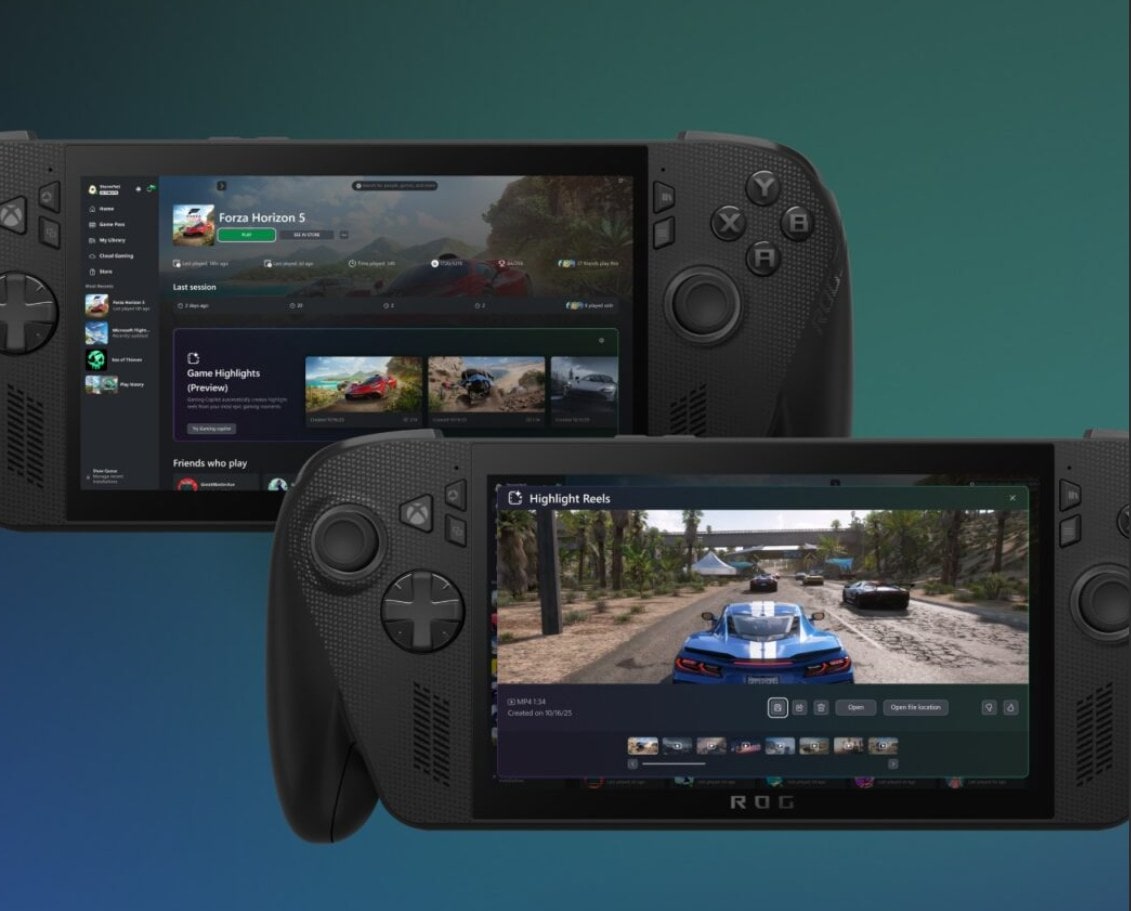
Highlight Reels is built to automatically capture your “wow” moments—epic boss fights, clutch victories, and other standout gameplay—then package them into a short replay you can share with friends online. Crucially, there is no extra software to install and no need to alt‑tab or break immersion; the capture runs in the background while you play and compiles the reel at the end of your session via the Xbox PC app.
During this early preview, the feature supports a curated set of popular titles, including:
-
Among Us
-
Lies of P
-
Elden Ring
-
Overwatch
-
Fortnite
-
Palworld
-
Forza Horizon 5
Xbox says it wants Insiders to hammer on the feature and submit feedback both in the experience and via the Xbox Insider Hub, as that input will help decide which games are added next and what improvements to prioritize.
How to enable and use Game Highlights on Ally X
Because Highlight Reels is built on top of Game Highlights (Preview), there are a few setup steps Ally X owners need to complete before they start seeing automatic clips.
-
Join the Xbox Insider Program
If you are not already an Insider, you will need to enroll through the Xbox Insider Program and install the Xbox Insider Hub app on your device. That is where you will also find surveys and report‑a‑problem tools for this preview. -
Turn on background recording
Highlight Reels depends on Windows’ capture stack, so background recording must be enabled. You can switch this on in multiple ways:-
Via Game Bar: Settings → More Settings → Widgets → “Record in the background while playing a game.”
-
Via Gaming Copilot: Gaming Copilot → Settings → Capture Settings → “Navigate to Capture Settings in Widget.”
-
Via Windows Settings: Settings → Gaming → Captures → “Record what happened.”
-
-
Play one of the supported games
Once background capture is enabled, jump into a supported title like Forza Horizon 5, Fortnite, Elden Ring, or Palworld on your ROG Xbox Ally X. -
Let Gaming Copilot and Game Highlights do the work
While you play, Gaming Copilot and the capture system will record moments in the background. When you wrap up your session, the Xbox PC app will automatically assemble a highlight reel from those clips, which you can review and share from the Game Highlights (Preview) section on that game’s page.
Xbox also encourages Insiders to take the dedicated survey in the Xbox Insider Hub after trying Highlight Reels so the team can refine detection, editing, and game support.
AI, NPUs, and the future of Highlight Reels
Highlight Reels is part of a broader push from Microsoft’s Gaming AI team to take advantage of Ally X’s neural processing unit (NPU) and make capture smarter, not just higher resolution. Previous reports and previews have described the feature—internally dubbed “Clip That”—as using the Ally X’s NPU to detect exciting gameplay moments automatically and record them at the OS level across a wide range of PC games.
Early testing for Highlight Reels has focused on popular live service and hardcore titles such as Forza Horizon 5, Palworld, Elden Ring, Overwatch, Fortnite, and others, with the long‑term expectation that it will expand to more of the PC catalog. Because the feature is currently limited to Ally X hardware and the Xbox Insider ring, it is also widely seen as a preview of what might show up in the next‑generation Xbox hardware, which is expected to include dedicated NPUs of its own.
How to share feedback and get support
As with other Xbox Insider experiments, Microsoft is leaning heavily on the community to shape where Highlight Reels goes next. Insiders can:
-
Use the built‑in feedback options in the Game Highlights experience
-
File issues and complete surveys via the Xbox Insider Hub app
-
Join the r/xboxinsiders subreddit, where official Xbox staff, moderators, and fellow testers discuss issues and feature behavior
The Xbox team stresses that Insider feedback directly influences which games get added, how detection logic works, and how the clips are presented and shared.
For now, Highlight Reels is a glimpse of a more automated, AI‑assisted capture future on Xbox PC and handheld devices—one where you can focus purely on playing, and let the system worry about grabbing those share‑worthy moments.
Recent Posts You Might Like
- Biggest and Best Releases This Week on Xbox (March 2–6): Kingdom Come: Deliverance 2, Planet of Lana 2, Marathon, and More
- Xbox Insiders on PC Get Exciting New Postgame Recaps Feature in the Xbox App
- New Xbox Era Feels Shady To Fans: Why Phil Spencer’s “Retirement” And Sarah Bond’s Exit Don’t Add Up\
- Xbox Game Pass Adds Final Fantasy 3 and Kingdom Come 2 Today as Outstanding March 2026 Lineup Kicks Off
Discover more from Microsoft News Now
Subscribe to get the latest posts sent to your email.
