
<
div class=”prose dark:prose-invert inline leading-relaxed break-words min-w-0 [word-break:break-word] prose-strong:font-bold [&>*:first-child]:mt-0 [&>*:last-child]:mb-0″>
Attackers are increasingly breaking into Microsoft 365 accounts without ever stealing a password. Instead, they are hijacking OAuth tokens and abusing Microsoft’s device code and app consent flows to get long‑lasting access to email, files, and collaboration tools—even when multi‑factor authentication (MFA) is enabled. For Microsoft 365 admins, this new Microsoft 365 OAuth hijacking campaign is a clear sign that identity security now means protecting tokens and app consent, not just user credentials.
How the new Microsoft 365 OAuth hijacking works

Recent reports from security vendors and Microsoft document a surge in phishing campaigns that specifically exploit the OAuth 2.0 Device Authorization Grant flow used by Microsoft 365 and Microsoft Entra ID. This flow is legitimate—designed to let users sign in on one device by entering a short code shown on another—but attackers have weaponized it.
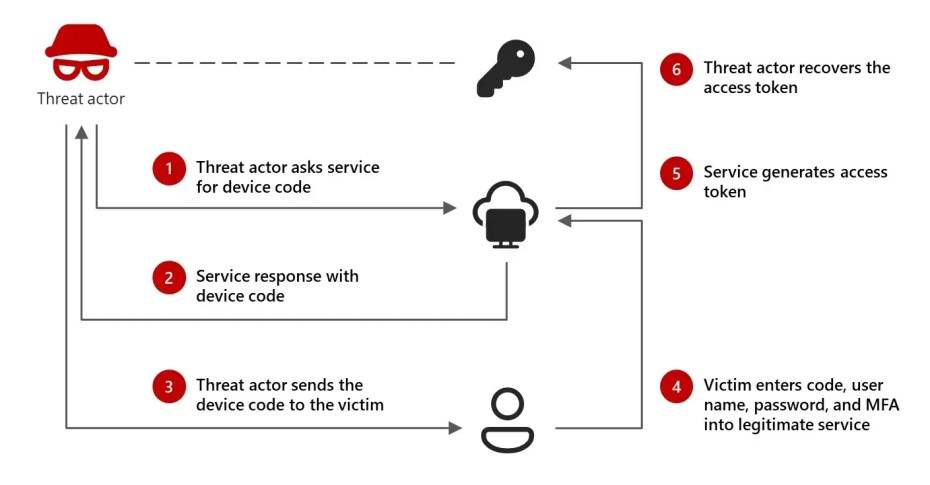
The attacker’s playbook typically looks like this:
-
They register or control an OAuth app capable of requesting Microsoft 365 data (mail, files, profile).
-
They start a device authorization flow, which returns a device code and a real Microsoft verification URL such as
https://microsoft.com/devicelogin. -
They send that code to a victim using phishing emails, fake notifications, or even voice calls, claiming the user must “verify a device,” “restore access,” or “complete security checks.”
-
The user goes to the legitimate Microsoft site, signs in, passes MFA, and enters the attacker’s code—unknowingly authorizing the attacker’s app.
-
The attacker, polling the token endpoint, collects the resulting OAuth access and refresh tokens and uses them to access the user’s Microsoft 365 data as a trusted app.
KnowBe4 describes this pattern as a “sophisticated phishing campaign bypassing M365 MFA” because the attacker waits until after the user has successfully completed MFA and then hijacks the issued tokens. CSO Online similarly notes that employees are tricked into registering an attacker’s device, after which “the crook uses the resulting OAuth tokens to maintain persistent access” to Microsoft 365 apps. Proofpoint and others have observed a broader surge in “device code phishing” and malicious OAuth abuse targeting Microsoft tenants.
Why this campaign is so hard to catch
There are three main reasons this wave of OAuth hijacking is particularly dangerous:
-
It uses real Microsoft URLs
Victims are sent to genuine Microsoft pages likemicrosoft.com/devicelogin, so traditional phishing awareness advice (“check the URL”) often fails. -
MFA is still completed successfully
The user signs in and completes MFA, and only then does Microsoft issue OAuth tokens that the attacker captures. From the platform’s point of view, all the identity checks passed. -
Activity looks like trusted app traffic
Once an attacker has a token for their app, they can access Outlook, OneDrive, SharePoint, Teams, and Graph APIs in a way that resembles normal cloud API usage, not a suspicious login from a strange IP.
Microsoft has previously documented threat actors misusing OAuth applications to send huge volumes of phishing mail, deploy crypto‑mining infrastructure, and maintain persistence in compromised tenants, all via properly issued app tokens. The device code phishing angle is simply the newest way to get those tokens without credential theft.
Who is being targeted
Multiple sources indicate that a wide range of organizations are at risk:
-
Proofpoint reports that device code phishing and OAuth abuse campaigns have targeted sectors like government, academia, and transportation, including activity from suspected Russia‑aligned threat clusters.
-
KnowBe4’s February 2026 analysis highlights North American businesses and professionals, including organizations that already enforce strong passwords and MFA.
-
Other reporting shows device code “vishing” calls aimed at Microsoft Entra accounts in technology, manufacturing, and finance, with attackers using stolen tokens to access not only Microsoft 365 but also connected SaaS apps integrated via single sign‑on.
At the same time, Microsoft’s own threat intelligence has tracked malicious OAuth app misuse going back several years, reinforcing that this is now a mainstream tactic for both nation‑state and financially motivated actors.
What Microsoft 365 admins should do now
Defending against this model of attack means treating OAuth apps and tokens as high‑value assets. Here are practical steps you can take immediately.
1. Lock down app consent and device code usage
First, reduce how freely apps can be granted access in your tenant:
-
Restrict user consent for apps, especially for sensitive scopes such as
Mail.Read,Files.Read.All, andoffline_access. -
Require admin approval for high‑privilege permissions using Entra’s admin consent workflows.
-
Review whether the device code flow is actually needed in your environment; if usage is limited, consider tighter policies or conditional access around it.
These controls don’t eliminate risk but make it much harder for an attacker’s malicious app to silently obtain the access it needs.
2. Continuously audit OAuth apps in your tenant
You should treat the list of registered and enterprise applications in Microsoft Entra as part of your attack surface:
-
Regularly review app registrations and enterprise applications for unfamiliar names, owners, or publishers.
-
Flag apps with overly broad permissions that don’t match a clear business requirement.
-
Remove unused or suspicious apps and ensure you have a process to quickly revoke consent when a threat is identified.
Microsoft’s own case studies show that malicious OAuth apps often sit unnoticed for long periods, quietly siphoning data or sending emails.
3. Improve logging, monitoring, and detections for OAuth abuse
Because these attacks operate at the token and app level, logging and detection need to adapt:
-
Monitor Entra sign‑in logs specifically for unusual device code authorization flows, particularly those tied to unexpected geolocations, user agents, or newly registered apps.
-
Look for abnormal Graph API patterns: large spikes in mailbox reads, file access, or Teams operations initiated by app identities instead of interactive users.
-
Correlate OAuth activity with email anomalies like new or hidden inbox rules, forwarding to external domains, and surges in outbound messages.
Where possible, integrate these signals into your SIEM or XDR stack and build specific hunting queries for device code and OAuth events.
4. Harden against token theft more broadly
This campaign is one part of a wider token‑centric threat landscape, including AiTM phishing and ConsentFix‑style attacks that target token issuance and storage. To reduce your exposure:
-
Minimize token exposure in browser storage, addressing XSS and other bugs that could let attackers grab tokens from localStorage or sessionStorage.
-
Prefer shorter‑lived access tokens with robust refresh token policies and revoke capabilities.
-
Use conditional access that evaluates device compliance, risk levels, and app identity—not just user identity—before granting access.
5. Update user training for OAuth‑era phishing
User awareness has to move beyond “don’t click weird links” to cover app consent flows and device codes:
-
Explain that simply seeing a real Microsoft URL is not enough; unsolicited prompts to enter device codes or approve apps are red flags.
-
Show users what a consent prompt looks like and why they should pause before granting a third‑party app broad access to mail or files.
-
Make it clear that IT or helpdesk staff will not ask users to input random codes from an email or phone call into
microsoft.com/devicelogin.
Even basic messaging like “if you didn’t start it, don’t complete it” for device code prompts can stop a lot of attacks.
How to respond if your tenant is compromised
If you suspect a Microsoft 365 OAuth hijacking incident, passwords alone are not enough to fix it. Your response should include:
-
Revoking app consent for any suspicious enterprise applications and deleting their service principals.
-
Invalidating tokens by revoking user sessions and forcing re‑authentication, then confirming no new malicious app registrations appear.
-
Reviewing audit logs for inappropriate data access, inbox rule creation, and unusual outbound mail from affected accounts.
-
Checking connected SaaS apps that rely on Microsoft Entra SSO for signs of lateral movement.
-
Tightening app consent and monitoring so that a similar incident is caught earlier next time.
The bottom line for Microsoft 365 security

The new Microsoft 365 OAuth hijacking and device code phishing campaign shows that attackers have fully embraced identity and token abuse as a primary way into cloud environments. For admins, the takeaway from this Microsoft 365 OAuth hijacking is straightforward: securing your tenant now means controlling which apps can act on behalf of your users, how tokens are issued and monitored, and how quickly you can revoke that access when something goes wrong.
Lock down app consent, monitor device code flows, and bring OAuth into your core threat model—because that’s exactly where attackers are operating today.
Discover more from Microsoft News Now
Subscribe to get the latest posts sent to your email.