
Microsoft’s beloved image editing tool, Paint, has received a significant update, marking a new era for the classic application that has been a staple of the Windows operating system for decades. The latest update, which began rolling out to Windows Insiders on March 13, 2024, introduces a slew of enhancements aimed at improving the user experience and expanding the app’s capabilities.
Microsoft Paint (version 11.2402.32.0) new enhancements
Enhanced brush size selection
One of the key features of this update is the introduction of a new size slider for pencil, brushes, and eraser tools, allowing users to choose from a wider range of size options more easily. This enhancement is designed to improve the brush size selection experience, enabling users to preview the selected size on the canvas as they drag the slider. To access this feature, users simply need to click on any of the pencil, brushes, or eraser tools, and a size slider will appear on the left side of the canvas.
Improved layers functionality
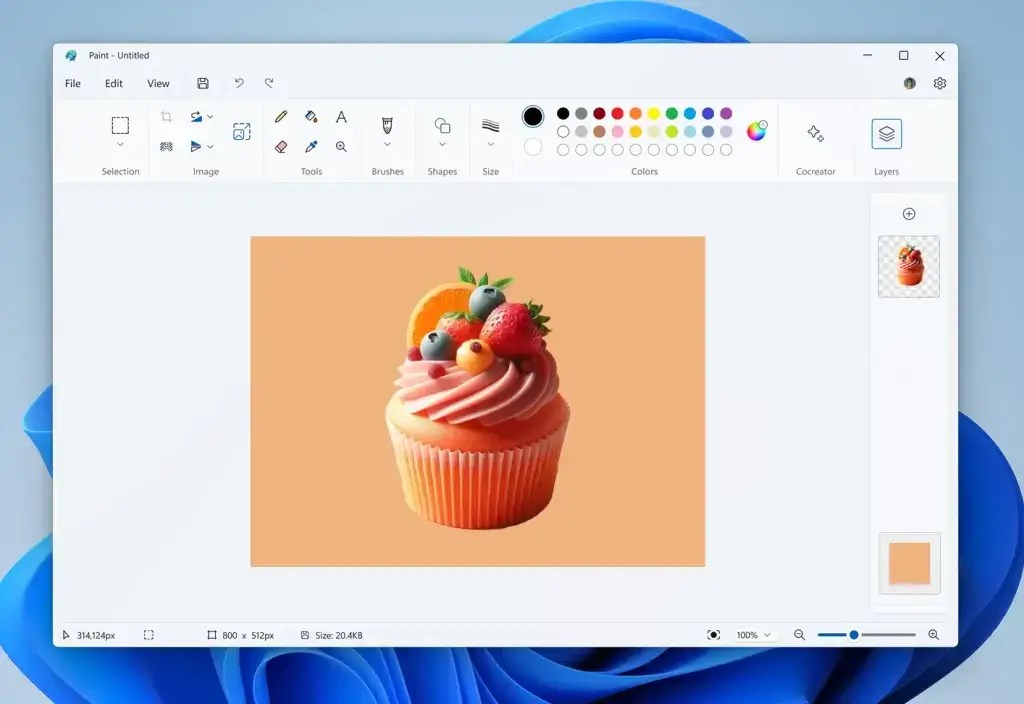
The update also brings improvements to the layers functionality in Paint. A new background option has been added to the Layers panel, allowing users to set the background color for the canvas. This feature can be accessed by opening the Layers panel and clicking the “Background” tile at the bottom or using the Ctrl + Shift + B keyboard shortcut. Additionally, users can now make the background completely transparent using the “Hide background” option or quickly show/hide the background with the Ctrl + Shift + H keyboard shortcut.
Furthermore, a new “Copy visible layers” option has been introduced, enabling users to copy all visible content across layers. This can be done by selecting an area using the selection tool and invoking the context menu or using the Ctrl + Shift + C keyboard shortcut. The traditional “Copy” (Ctrl + C) function will continue to copy the visible content from the current layer only.
Community feedback and future enhancements
Microsoft has emphasized the importance of community feedback in shaping the future of Paint. Users are encouraged to file feedback in the Feedback Hub under Apps > Paint, as the company continues to monitor responses and suggestions from the community. This iterative approach ensures that Paint evolves in a way that meets the needs and expectations of its users.
What’s next for Microsoft Paint
The latest update to Microsoft Paint represents a significant step forward for the iconic application, introducing features that enhance its usability and expand its capabilities. By improving brush size selection, adding new layers functionality, and actively seeking community feedback, Microsoft is committed to ensuring that Paint remains a valuable tool for users in the Windows ecosystem. As the update begins rolling out to Windows Insiders, it’s clear that Paint is entering a new era, one that promises to bring even more creativity and functionality to this classic app.
Discover more from Microsoft News Now
Subscribe to get the latest posts sent to your email.