

Microsoft detailed a broad set of Windows 11 25H2 changes that are “currently rolling out,” spanning AI actions in File Explorer, widget updates, Gaming Copilot integration, security, developer tools, and Copilot+ PC enhancements, all framed as making Windows more intuitive, secure, accessible, and reliable for everyone. Windows 11 version 25H2 is available via the seeker experience, and Microsoft recommends installing the October 2025 security update (KB5066835) to receive the latest features as they roll out via controlled feature rollout, with many items also available on 24H2 due to the shared servicing branch.
File Explorer upgrades
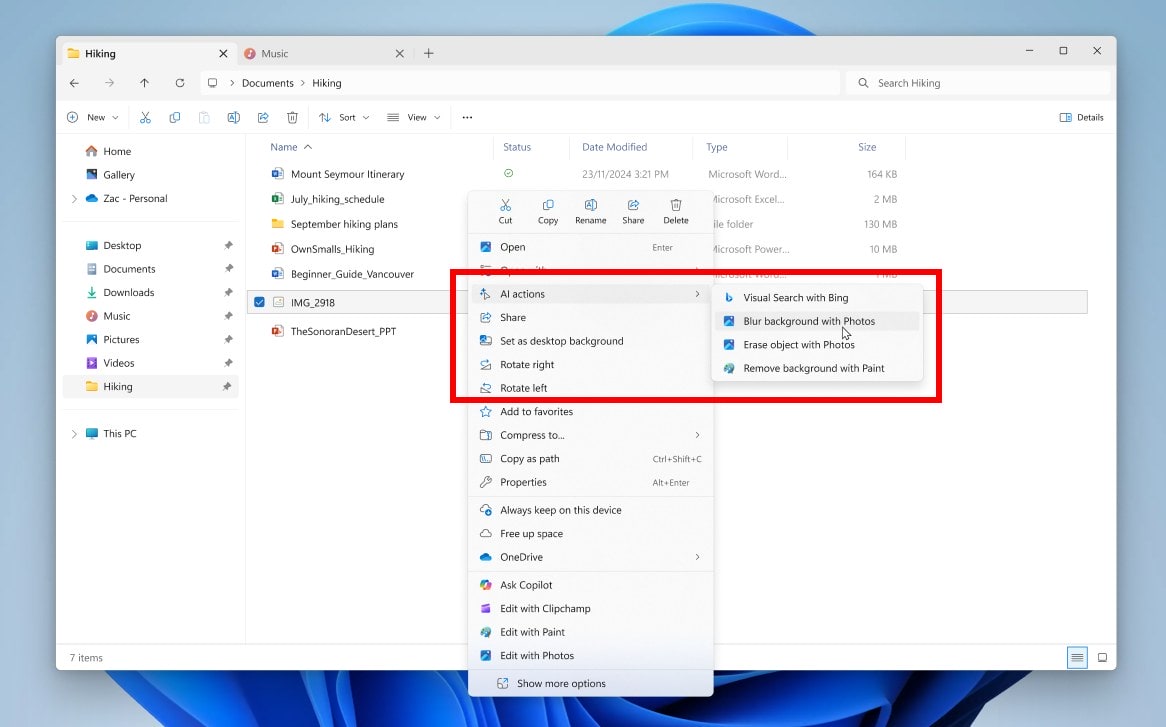
AI actions in File Explorer let you right‑click images to launch quick tasks like Bing Visual Search, Blur background, Erase objects, and Remove background, with a menu entry also appearing via Shift + F10 for keyboard users. Microsoft 365 subscribers get a Summarize action in Copilot for files stored in OneDrive and SharePoint, enabling quick summaries without opening the file, plus deeper OneDrive/Copilot integration to surface content contextually. For commercial users signed in with work or school accounts, People icons now appear in Activity and Recommended, and hovering reveals Microsoft 365 People cards to understand who’s connected to the file and how.

Widgets improvements

The Discover feed on the Widgets board has a refreshed visual layout with more organized, personalized content and Copilot‑curated stories that bundle summaries, videos, and images from trusted publishers. Multiple dashboards let you switch between your widgets and the Discover feed using a new left‑side navigation bar for more space and easier organization. Lock screen widgets can now be added, removed, and rearranged for items like Weather, Watchlist, and Sports, with suggested widgets and support for any widget offering a small size option configurable in Settings.
Accessibility updates

Narrator now includes a Braille viewer that shows on‑screen text alongside its Braille equivalent to support classroom or training scenarios where teachers and students follow together with a Braille display. Narrator’s experience in Word is more natural, with improved voice feedback, consistent list announcements, clearer table boundaries, better navigation for comments and footnotes, and reliable continuous reading.
PC gaming features
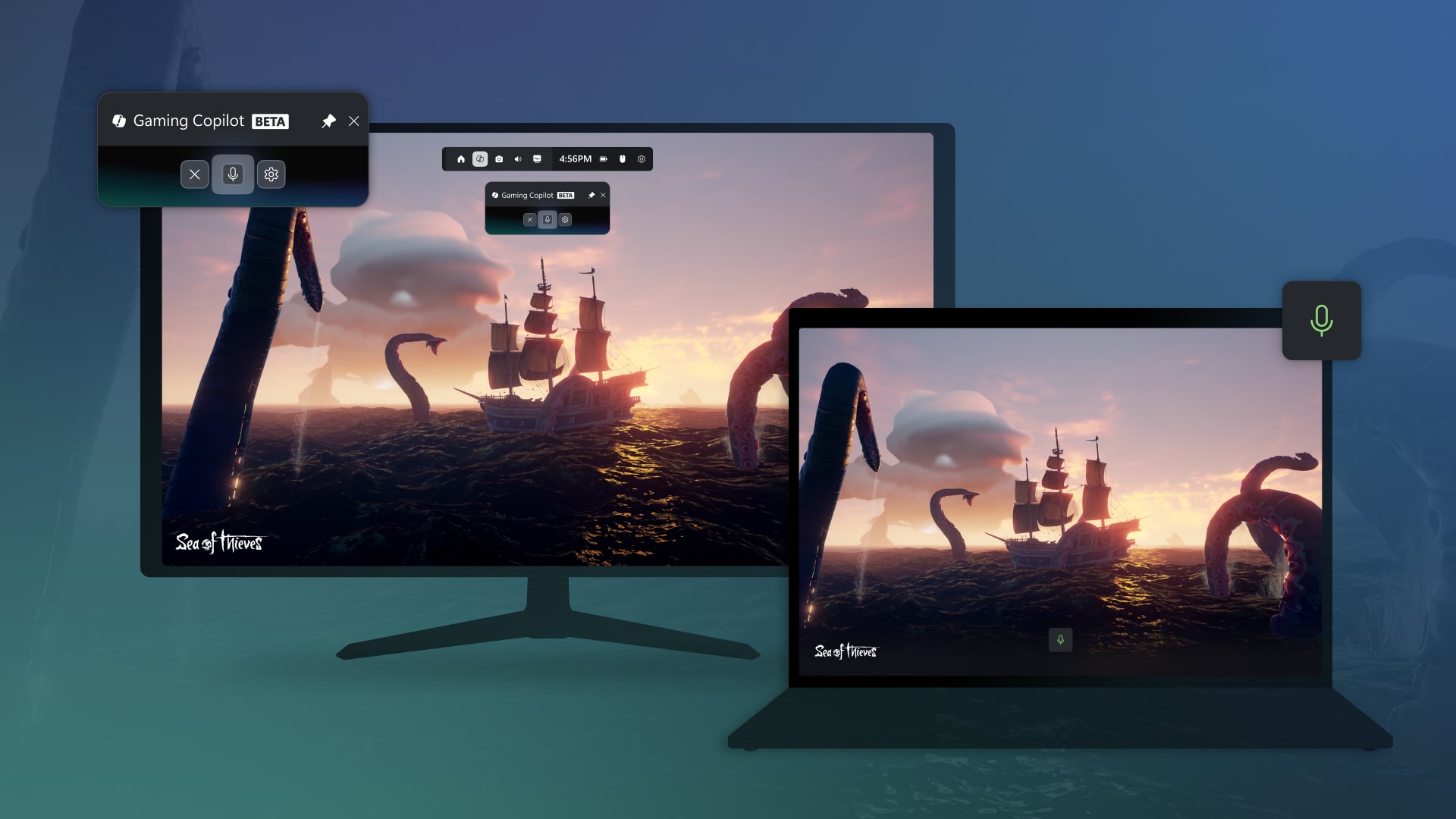
Gaming Copilot (Beta) is now integrated into Game Bar, letting players use Voice Mode to ask for in‑game help, recommendations, or questions about achievements and play history without leaving the game, assuming the Xbox app is installed. The Xbox PC app adds an aggregated library and history view across Windows PCs and handhelds, while a new Network Quality Indicator helps diagnose cloud gaming issues like audio or video disruptions with toggles in both settings and the Cloud Gaming widget. Sync handling for unsynced saves is improved with visible progress, device name, timestamps, and more details, plus Game Bar social widgets get a cleaner design and better controller navigation, aligning with Xbox’s September changes.

Security and identity
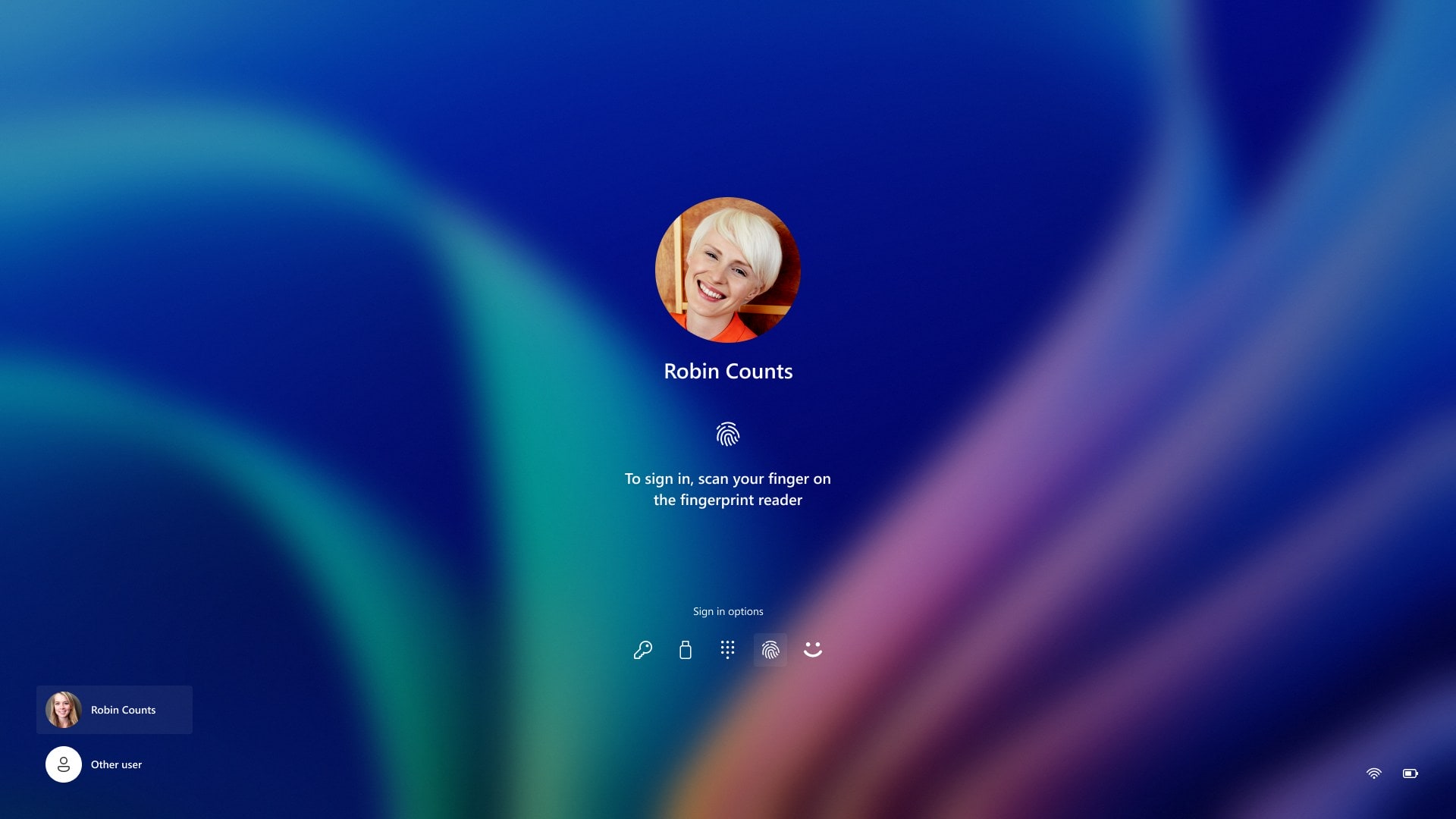
Microsoft introduced durable security and privacy principles for new agentic features, ensuring user control, visibility, and responsible preview rollouts as Windows expands Copilot capabilities. Windows 11 adds protection against phishing and malware through enhanced identity safeguards and stronger app/driver controls under the broader Windows Resiliency Initiative to improve reliability and defense in depth. Windows Hello gets a modern visual refresh that prioritizes the best credential automatically, improves passkey flows, and makes switching authentication options like passkeys or connected devices cleaner and faster.
Passkeys, Edge, and platform hardening

Windows 11 now supports seamless passkey manager integration so you can use a third‑party credential manager like 1Password for passkeys after enabling it in Settings and verifying with Windows Hello.

Microsoft Edge consolidates credentials under Microsoft Password Manager, retiring the old Wallet experience to improve integration, syncing, and monitoring for reused or breached passwords via Password Monitor.
Parts of the Windows kernel have been rewritten in Rust to mitigate memory corruption vulnerabilities and reduce attack surface, and driver developers can begin writing drivers in Rust for security and reliability gains.

Connectivity and enterprise control
Windows 11 supports Wi‑Fi 7 for faster, more reliable wireless networks across consumer and enterprise access points, enabling higher throughput and improved security in modern environments. IT admins can deploy App Control for Business using Intune managed installer to designate line‑of‑business apps as verified and permitted, enforcing trusted app execution across the organization.
Developer‑focused updates
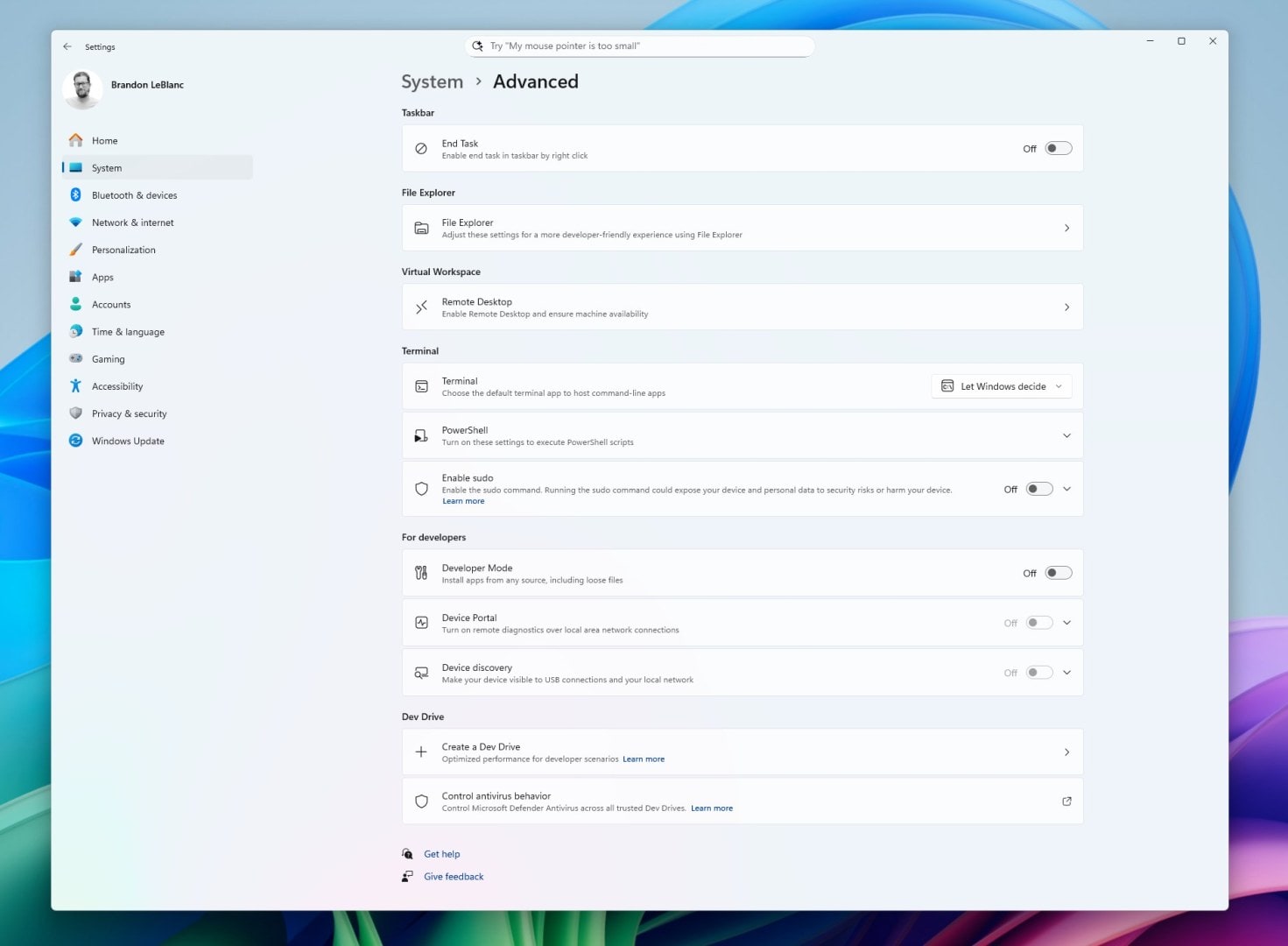
A redesigned Advanced settings page replaces the old For Developers page, adding File Explorer + version control details like branch, diff count, and last commit directly in Explorer when selecting repo folders, and the page is open source on GitHub. The Edit command‑line text editor now ships with Windows for quick terminal edits, is open source, and includes a full feature set documented for power users who prefer staying in the shell. Windows ML is now generally available as the built‑in AI inferencing runtime across CPU, GPU, and NPU, forming the foundation of Windows AI Foundry and Foundry Local to scale local AI across devices.
Microsoft Edit
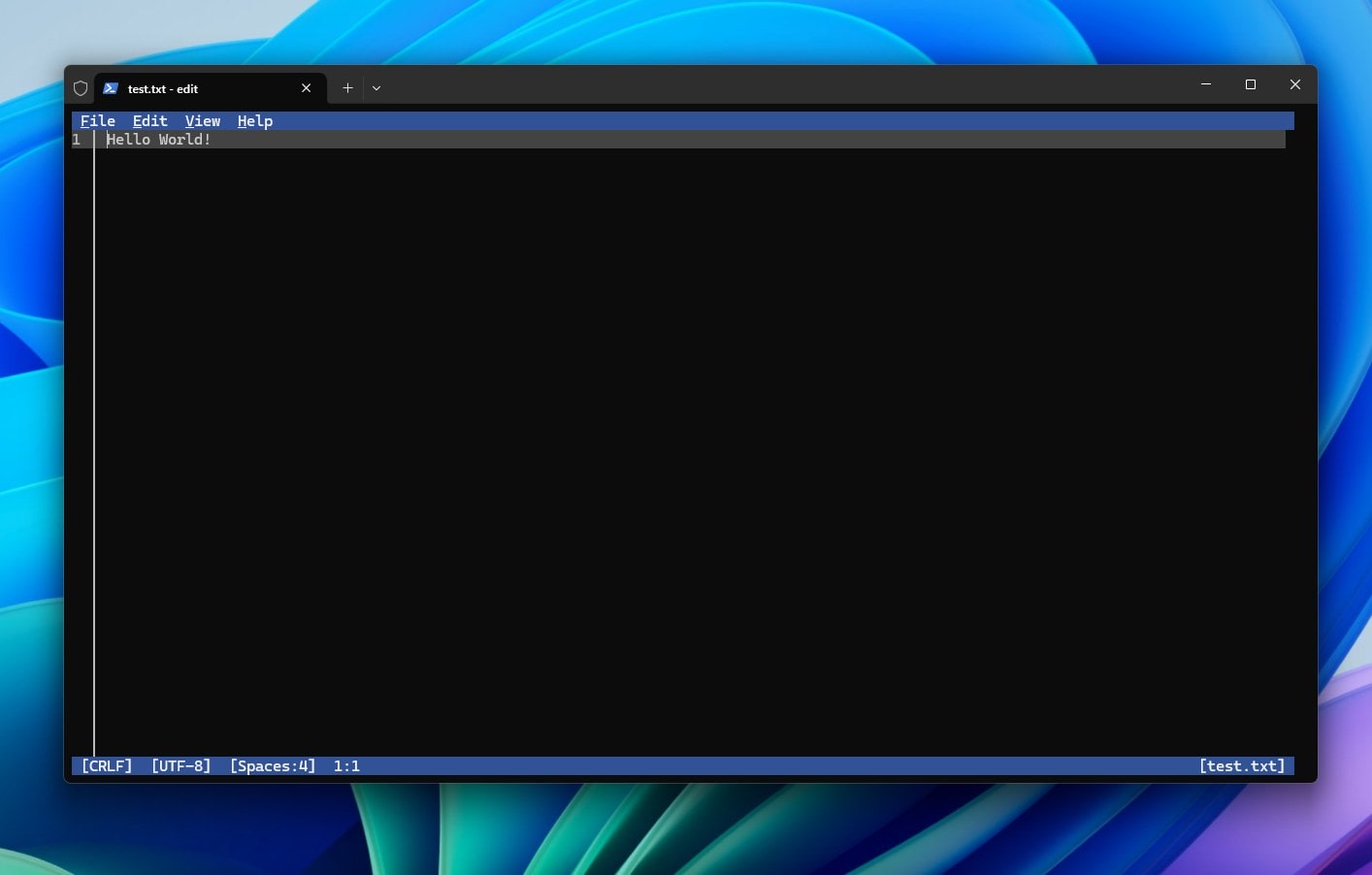
Windows now includes Edit, a lightweight command-line text editor that lets you open and modify files right from the terminal by typing edit followed by a file name or simply edit to launch the editor itself. The project is open source on GitHub, and a complete rundown of capabilities is available in the official documentation for those who want to dig deeper. If Edit isn’t present on your current build yet, you can install it quickly with winget and start editing without switching away from the command line workflow you already use. Edit supports a friendly TUI with mouse interactions, find-and-replace (including regex), and word wrap to keep editing fast and approachable. It’s designed to be a simple, built-in CLI editor for Windows so developers and power users always have a dependable default at hand.
Graphics, diagnostics, and performance
Advanced shader delivery, introduced with Xbox and AMD, tackles first‑launch shader compilation stutter and long load times, and developers can adopt it via the latest Agility SDK 1.618. Task Manager aligns CPU workload metrics with industry standards across all pages, and an optional CPU Utility column is available on the Details tab for backward compatibility. These changes aim to deliver smoother gameplay, consistent telemetry, and easier developer adoption of modern graphics and performance pipelines.
UI polish and productivity

A larger clock with seconds returns to Notification Center, and the Notification Center now shows on secondary monitors by selecting date and time on the secondary taskbar. Hardware on‑screen indicators for brightness, volume, airplane mode, and virtual desktops can be moved to different screen positions in Settings, while en‑dash and em‑dash now have simple keyboard shortcuts with Windows key combinations unless Magnifier is active. Windows continues modernizing dialog pop‑ups and moves more time, language, and keyboard settings from Control Panel into Settings, making it easier to manage date formats, time servers, number/currency formats, and accessibility preferences.

Copilot+ PC experiences
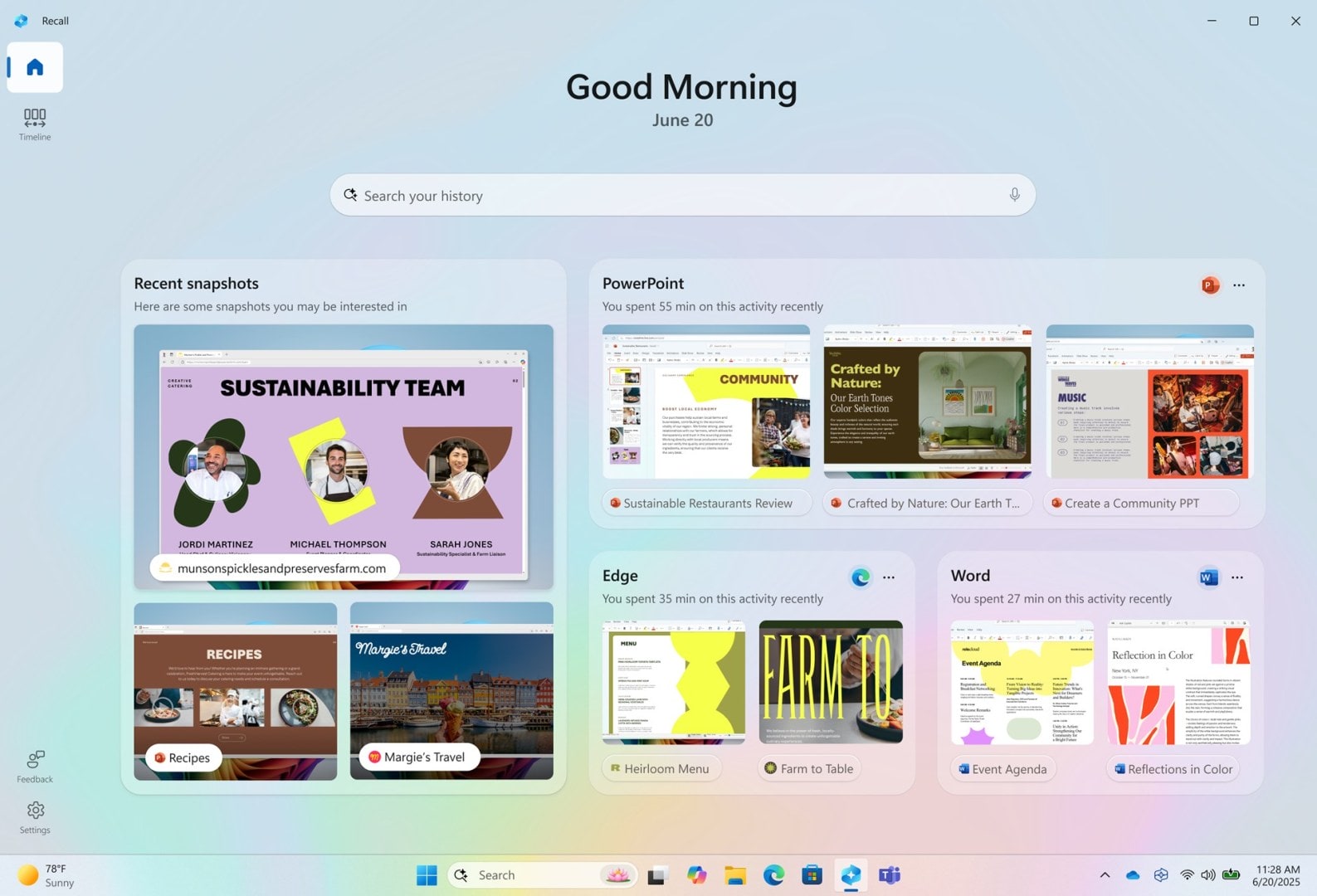
Recall (preview) gets a new personalized homepage that surfaces recent snapshots and your top apps/websites for quick task resumption after opting into snapshot collection, with left‑side navigation improving discovery. Click to Do now shows new and popular action tags in its context menu, provides more concise summaries, and includes a quick tutorial, with many on‑device actions powered by the Phi Silica small language model. Agent in Settings adds direct navigation links to the right settings pages and is available across all Copilot+ PCs, powered by a new on‑device model called Mu for fast, private intent handling.

Voice access now supports natural language commanding on Copilot+ PCs, understanding flexible phrases like “open Edge,” “switch to Edge,” or “please open the Edge browser” instead of rigid syntax.
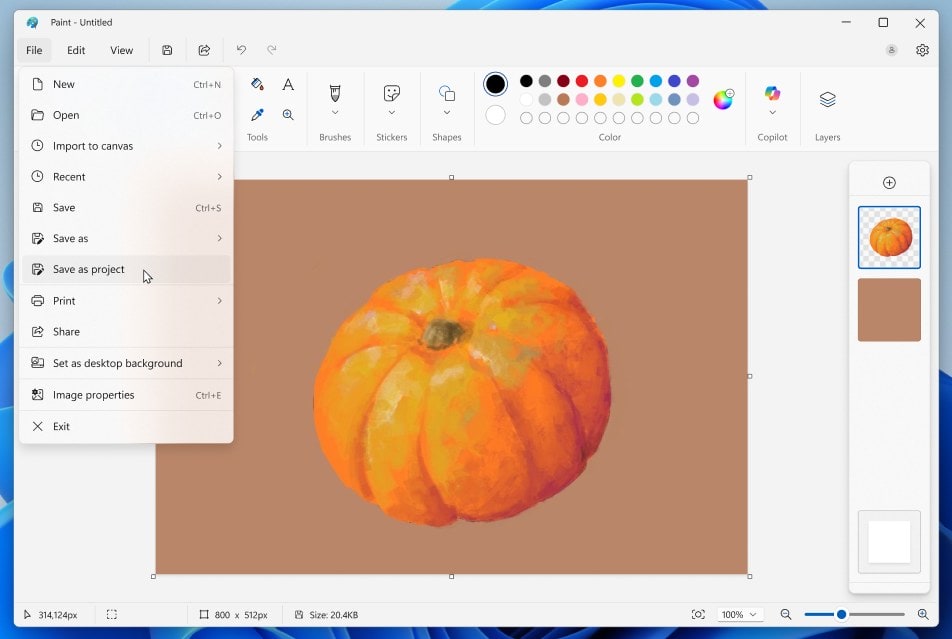

Paint introduces project files (.paint) and an opacity slider for pencil/brush strokes, Snipping Tool adds Quick markup before capture, and Notepad on Copilot+ PCs gains Summarize, Write, and Rewrite with no subscription required using local models, with optional cloud model switching if subscribed.

How to get it
Windows 11 version 25H2 is live today via the seeker experience in Windows Update on eligible hardware, and once installed you should apply the October 2025 security update (KB5066835) for the latest feature rollouts under controlled feature rollout, with most features also arriving on 24H2 due to a shared servicing branch. Microsoft emphasizes keeping Windows Update turned on to ensure you receive ongoing features and security improvements as they become available to your device. Check out the blog post for more detailed information on all the changes.
Recent Posts
- New “Designed for Xbox” accessories arrive for ROG Xbox Ally and Ally X: storage, protection, docks, controller, and earbuds
- Windows 11’s next wave makes every PC an AI PC with Copilot Voice, Vision, Actions, New Taskbar and Search, And So Much More
- Xbox Free Play Days: F1 25, Everspace, Hell Let Loose, The Stone of Madness, and Ra Ra Boom playable Oct 16–19
- Unlock Windows 11 Power: The Ultimate Guide to Powerful Powercfg Commands for Advanced Energy Efficiency & Troubleshooting
Discover more from Microsoft News Now
Subscribe to get the latest posts sent to your email.
