Skip to content
July 5, 2026
  • AI & Copilot
  • Azure Cloud
  • How To Guides
  • Microsoft 365 Office
  • Windows
  • XBOX
  • Privacy Policy

Microsoft News Now

The Home of Microsoft News Today

Primary Menu
  • AI & Copilot
  • Azure Cloud
  • How To Guides
  • Microsoft 365 Office
  • Windows
  • XBOX
  • Privacy Policy
Light/Dark Button
Subscribe

Home - News - Critical Windows security flaw: Windows SmartScreen bypass exploited since 2018

  • News

Critical Windows security flaw: Windows SmartScreen bypass exploited since 2018

Microsoft's Windows SmartScreen and Smart App Control have been vulnerable to a bypass technique since 2018, potentially exposing users to malware. Learn about the implications and Microsoft's response.
Dave W. Shanahan 2 years ago (Last updated: 1 year ago) 3 minutes read
shanabanana223_square_windows_logo_against_red_alert_background_5bae8b4e-2801-48e9-9439-48dfae7e9639

A critical security flaw in Microsoft’s Windows SmartScreen and Smart App Control has been exploited since 2018, potentially exposing millions of users to malware threats. This vulnerability, which affects both Windows 10 and Windows 11 systems, allows attackers to bypass crucial security measures designed to protect users from malicious files.

As noted in the report by BleepingComputer, security researcher Will Dormann recently brought attention to this long-standing issue, demonstrating how easily the “mark-of-the-web” (MOTW) security feature can be circumvented. MOTW is a crucial component that flags files downloaded from the internet, prompting additional security checks through SmartScreen.

Microsoft’s Windows SmartScreen and Smart App Control vulnerability

Critical Windows security flaw: Windows SmartScreen bypass exploited since 2018
Smart App Control LNK stomping demo (Elastic Security Labs)

Dormann’s findings reveal that by using a specific technique involving the ISO disk image format, attackers can distribute malicious files that completely bypass SmartScreen warnings. This vulnerability extends to Windows 11’s Smart App Control feature, which relies on the same underlying technology.

The bypass technique exploits a flaw in how Windows handles ISO files. When a user downloads an ISO file, Windows doesn’t apply the MOTW flag to its contents. As a result, when the ISO is mounted and its contents are accessed, SmartScreen fails to recognize these files as potentially dangerous, even if they contain malware.
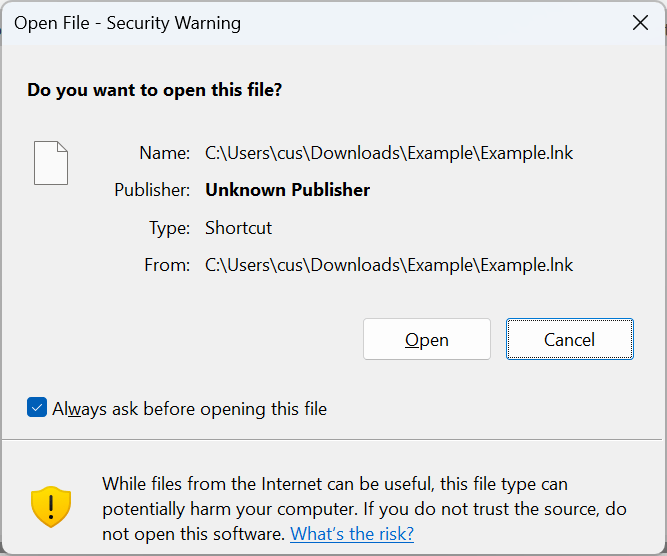
Critical Windows security flaw: Windows SmartScreen bypass exploited since 2018
Warning when opening downloaded files (BleepingComputer)

This vulnerability is particularly concerning because ISO files are commonly used for legitimate purposes, such as distributing software or system images. Malicious actors can exploit this trust to deliver harmful payloads without triggering security warnings.

Implications and risks

The implications of this vulnerability are significant, as it has potentially been exploited by malicious actors for years. Security experts are urging Microsoft to prioritize this fix, given the critical nature of SmartScreen in Windows’ defense against malware.

The risk extends beyond individual users to encompass businesses and organizations that rely on Windows systems. Attackers could potentially use this technique to bypass corporate security measures, potentially leading to data breaches, ransomware attacks, or other forms of cybercrime.

Protective measures for users

Critical Windows security flaw: Windows SmartScreen bypass exploited since 2018

As we await Microsoft’s official patch, users should remain vigilant and rely on additional security measures. Here are some recommendations:

  1. Exercise extreme caution when downloading and opening files from the internet, especially those in ISO format.
  2. Ensure your antivirus software is up-to-date and perform regular system scans.
  3. Be wary of unsolicited emails or messages containing file attachments or download links.
  4. Consider using alternative file formats when possible, avoiding ISO files from untrusted sources.
  5. Enable all available security features in Windows, including Windows Defender and regular system updates.

Broader context

Critical Windows security flaw: Windows SmartScreen bypass exploited since 2018

This incident serves as a reminder of the ongoing challenges in cybersecurity and the importance of regular security updates and patches for operating systems and applications. It also highlights the need for a multi-layered approach to security, where users and organizations don’t rely solely on built-in OS protections.

The discovery of this long-standing vulnerability also raises questions about the effectiveness of security audits and the potential for other undiscovered flaws in widely-used software. It underscores the vital role that independent security researchers play in identifying and reporting such vulnerabilities.

As the digital landscape continues to evolve, with cyber threats becoming increasingly sophisticated, the importance of robust, adaptive security measures cannot be overstated. Users, organizations, and software developers must remain vigilant and proactive in addressing potential security risks.

About The Author

Windows SmartScreen

Dave W. Shanahan

I’m Dave W. Shanahan, a Microsoft enthusiast with a passion for Windows, Xbox, Microsoft 365 Copilot, Azure, and more. I started MSFTNewsNow.com to keep the world updated on Microsoft news. Based in Massachusetts, you can email me at davewshanahan@gmail.com.

See author's posts

Like this:

LikeLoading…

Related


Discover more from Microsoft News Now

Subscribe to get the latest posts sent to your email.

Tags: CybersecurityDeveloperMicrosoftPowerShellSecurityWindowsWindows 10Windows 11

Post navigation

Previous: Console Wars: The Card Game brings epic Playstation 5 vs. Xbox Series S|X gaming rivalry to tabletops
Next: Microsoft takes center stage at Black Hat USA 2024 with enhanced AI security focus

Related Stories

Next Week on XBOX: Ultimate Assassin’s Creed Black Flag Resynced, College Football 27, Palworld 1.0, and More for an Exciting Week July 6–10
  • News
  • XBOX and Gaming

Next Week on XBOX: Ultimate Assassin’s Creed Black Flag Resynced, College Football 27, Palworld 1.0, and More for an Exciting Week July 6–10

Dave W. Shanahan 1 day ago 0
XBOX Free Play Days: Call of Duty Black Ops 7, Diablo IV, Ikonei Island, and More Go Free This Week
  • News
  • XBOX and Gaming

XBOX Free Play Days: Call of Duty Black Ops 7, Diablo IV, Ikonei Island, and More Go Free This Week

Dave W. Shanahan 2 days ago 0
Microsoft Frontier Company: Microsoft's $2.5B Bet On Trusted Enterprise AI Transformation
  • News
  • Enterprise

Microsoft Frontier Company: Microsoft’s Big $2.5B Bet On Trusted Enterprise AI Transformation

Dave W. Shanahan 3 days ago 0

AccessibilityAmazonAndroidAuthenticationAzureCall of DutyCopilotCybersecurityDeveloperEnterpriseFree Play DaysGamingGenerative AIGitHubGoogleLinkedinMicrosoftMicrosoft 365Microsoft 365 CopilotMicrosoft CopilotMicrosoft EdgeMicrosoft StoreMicrosoft TeamsNext Week on XBOXOpenAIOutlookPatch TuesdayPrivacySecuritySettingsSharePointSurfaceTwitterWindowsWindows 10Windows 11Windows InsiderXBOXXBOX Game PassXBOX Game Pass UltimateXBOX OneXBOX Play AnywhereXBOX Series XXBOX Series X|SXBOX Wire

Useful Links

  • AI and Copilot (249)
  • Azure & Cloud (35)
  • Developers (3)
  • Enterprise (4)
  • How To Guides (99)
  • Microsoft 365/Office (97)
  • Microsoft Announcements (97)
  • News (1,272)
  • Security (78)
  • Surface (47)
  • Windows (168)
  • XBOX and Gaming (418)

You May Have Missed

Next Week on XBOX: Ultimate Assassin’s Creed Black Flag Resynced, College Football 27, Palworld 1.0, and More for an Exciting Week July 6–10
  • News
  • XBOX and Gaming

Next Week on XBOX: Ultimate Assassin’s Creed Black Flag Resynced, College Football 27, Palworld 1.0, and More for an Exciting Week July 6–10

Dave W. Shanahan 1 day ago 0
XBOX Free Play Days: Call of Duty Black Ops 7, Diablo IV, Ikonei Island, and More Go Free This Week
  • News
  • XBOX and Gaming

XBOX Free Play Days: Call of Duty Black Ops 7, Diablo IV, Ikonei Island, and More Go Free This Week

Dave W. Shanahan 2 days ago 0
Microsoft Frontier Company: Microsoft's $2.5B Bet On Trusted Enterprise AI Transformation
  • News
  • Enterprise

Microsoft Frontier Company: Microsoft’s Big $2.5B Bet On Trusted Enterprise AI Transformation

Dave W. Shanahan 3 days ago 0
Microsoft Teams Rolls Out Smarter Bot Protection To Keep Unwanted AI Out Of Your Meetings
  • News
  • Microsoft 365/Office

Smarter Microsoft Teams Bot Protection Rolls Out To Keep Unwanted AI Out Of Your Meetings

Dave W. Shanahan 3 days ago 0
  • AI & Copilot
  • Azure Cloud
  • How To Guides
  • Microsoft 365 Office
  • Windows
  • XBOX
  • Privacy Policy
Copyright © 2026 All rights reserved. ReviewNews by AF themes.

    %d