
Microsoft’s Xbox division has just launched a major new AI-powered experience for PC gamers: Gaming Copilot (Beta) is now available on Game Bar for all Xbox Insiders enrolled in the PC Gaming Preview program. Here’s a full breakdown of what’s new, how Gaming Copilot (Beta) works, and why this is a major step forward for immersive, player-centered support and gaming productivity.
What Is Gaming Copilot (Beta)?

Gaming Copilot is an intelligent, real-time assistant that integrates directly into the Xbox Game Bar on Windows PCs. Designed as the “ultimate gaming sidekick,” this AI tool helps players overcome challenges, get instant answers, improve their skills, access account insights, and make the most of every session without breaking immersion.
Unlike other forms of entertainment, games can leave players stuck or searching for solutions. Gaming Copilot addresses these pain points, making your PC gaming more seamless and personalized—always ready when you need it, and unobtrusive when you don’t.
Seamless In-Game Assistance: Key Features
1. Voice Mode Powered by AI

-
Pin the Copilot widget: Easily keep Copilot on hand while actively playing.
-
Conversational voice support: Ask for tips, guidance, or troubleshooting through voice commands—no more alt-tabbing out or searching guides.
-
Continuous conversation: Pin the widget, chat naturally, and Copilot stays right with you as you play.
2. Screenshot-Driven Contextual Help
-
Smarter responses: Copilot now utilizes screenshots of your gameplay to offer highly relevant advice and solutions based on exactly what’s happening in-game.
-
Hands-off support: No need to describe the screen—just reference what you see, and Copilot understands.
-
Customizable screenshot settings: Manage privacy and screenshot integration directly in the widget’s Capture Settings.
3. Deeper Personalization & Proactive Coaching

-
Game and Xbox activity awareness: Copilot knows what you’re playing, tracking interests, play history, and achievements to tailor advice and suggestions.
-
Future upgrades: Microsoft promises even richer game-specific coaching and new features with ongoing updates driven by community feedback.
Initial Availability and How to Get Started
Gaming Copilot (Beta) launches first for Xbox Insiders on Windows PCs, including those testing Windows handhelds (like the upcoming ROG Xbox Ally and ROG Xbox Ally X). Handheld functionality is limited for now, but full support is on the way. The experience is currently available in English to Xbox Insiders aged 18+ in select regions (U.S., Australia, New Zealand, Japan, Singapore, and more).

How to try Gaming Copilot now:
-
Install the Xbox PC app on your Windows device, if not already done.
-
Join the Xbox Insider Program:
-
Download the Xbox Insider Hub for Windows PC or on Xbox consoles.
-
Enroll in the PC Gaming Preview.
-
-
Access Game Bar:
-
Press Windows logo key + G over your game or desktop to bring up Game Bar.
-
Look for the Gaming Copilot icon in the Home Bar.
-
Log in with your Xbox account for the full experience.
-
You can also test early Copilot capabilities via the Xbox mobile app, offering a second-screen approach so you’re never distracted from the main gameplay.
How Copilot Fits into the Xbox Ecosystem
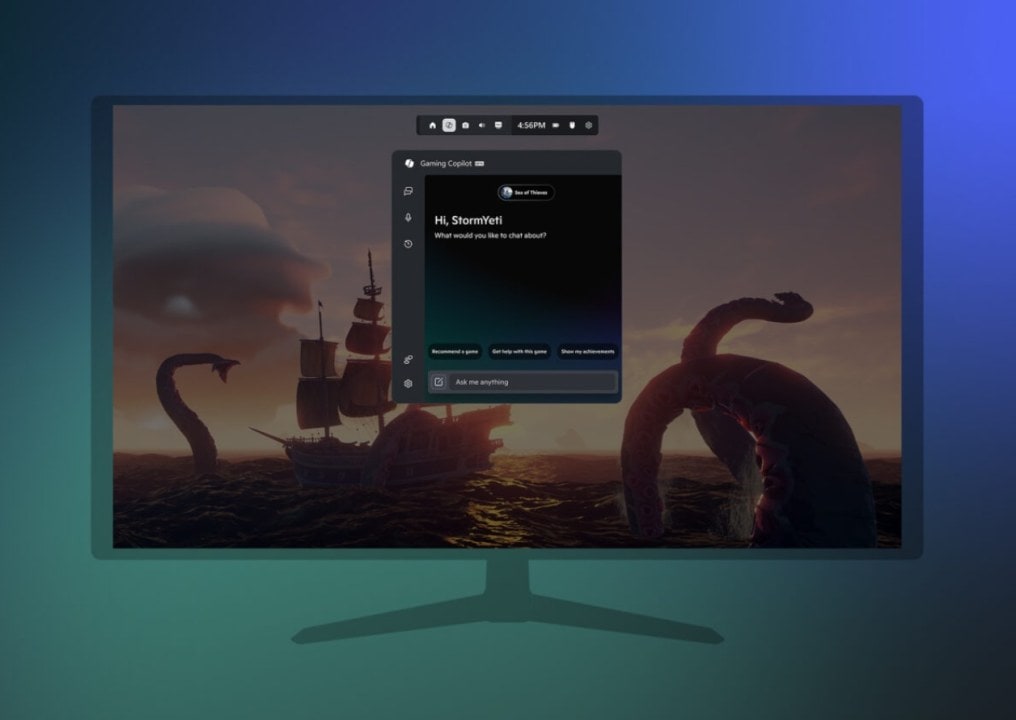
Microsoft is committed to bringing new features like Gaming Copilot to players quickly—prioritizing feedback from the Insider community. Copilot is poised to become an integral part of future gaming on Xbox, complementing tools like the Xbox mobile app and paving the way for enhanced integration on handheld devices.
-
Provide feedback easily: Mark Copilot responses as helpful or not, or use the ‘Give Feedback’ feature right in the Game Bar Copilot widget.
-
Join the discussion: Fellow Insiders, Xbox team members, and official mods are active in the Xbox Insider Subreddit, where you can share experiences, ask questions, and troubleshoot as a community.
-
Not an Insider yet?
-
Join here for early access to features and to help shape the future of Xbox.
-
Helpful Resources & Next Steps
-
Stay informed on the official Xbox Insider Twitter/X profile and the Xbox Insider SubReddit.
Why This Matters for Xbox and PC Gamers
Gaming Copilot signals a new era of smart, integrated support where AI is your partner—not just a tool. With in-game screenshot analysis and on-the-fly voice support, gamers can spend more time playing and less time stuck, confused, or searching for answers online. Early Insider feedback will shape future iterations, with Microsoft promising continuous enhancements and wider platform support soon.
For those wanting to get involved earlier, the Xbox Insider Program is your fast track to Microsoft’s gaming innovations, allowing you to experience and help define features like Copilot before the general public.
Related Posts
- Xbox June 2025 Update: Copilot for Gaming, Aggregated Library, Cloud Streaming, and Every New Feature Explained
- Copilot for Gaming (Beta) Begins Rolling Out on Mobile, Xbox’s New and Advanced AI Sidekick Enters Early Testing
- Impressive Xbox Insiders Get Cross-Device Play History and Full Cloud-Playable Library Arrive on PC in Major Gaming Upgrade
- Microsoft Copilot App on Windows: Vision Desktop Share Breakthrough Update Begins Rolling Out to Insiders
- Microsoft Suddenly Shuts Down Movies & TV Store on Xbox and Windows 11, Leaving Many Users Disappointed
Discover more from Microsoft News Now
Subscribe to get the latest posts sent to your email.
