
Microsoft has recently announced the release of Windows 11 Insider Preview Build 26080 to both the Canary and Dev Channels. This new build introduces a range of features and improvements, offering a sneak peek into what the future holds for Windows 11 users.
Windows 11 Insider Preview Build 26080 highlights
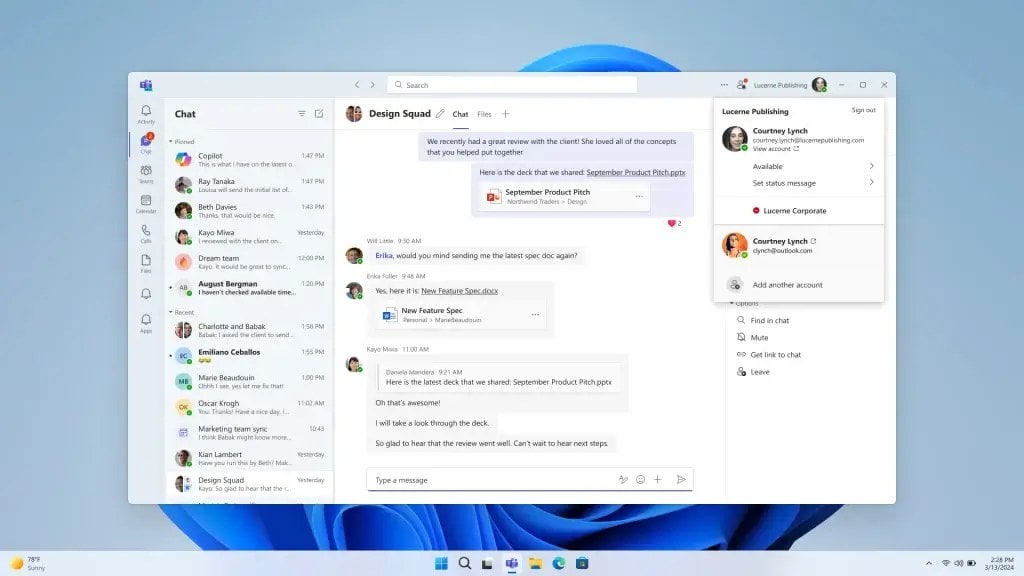
Unified Microsoft Teams experience

One of the most notable updates in Build 26080 is the introduction of a unified Microsoft Teams experience. This update allows users to seamlessly switch between multiple cloud environments, tenants, and account types across personal and work accounts, all within a single application. This change addresses the feedback from users who have long sought a more integrated Teams experience, eliminating the need to juggle between different apps for personal and work communication.
Enhanced Copilot in Windows 11

Microsoft is also rolling out updates to its Copilot feature in Windows, beginning with the Canary Channel. These updates include a new undocked mode that allows Copilot to act as a regular application window, which can be resized and moved around the screen. This makes Copilot more versatile and user-friendly, catering to a wider range of use cases and preferences.
Additionally, Copilot is receiving a new Power Automate plugin, enabling users to automate file management tasks and workflows involving Excel and PDF files. This integration opens up new possibilities for streamlining repetitive tasks and enhancing productivity.
Taskbar and system tray improvements

Build 26080 brings updates to the taskbar and system tray, including a redesigned progress bar under app icons to improve visibility. This change applies to both the taskbar and the Start menu, making it easier for users to monitor the progress of ongoing tasks.

File Explorer enhancements

The new build also introduces improvements to File Explorer, such as the ability to apply selected actions (skip, replace) to all file name conflicts when extracting files. This enhancement simplifies file management and reduces the time spent resolving conflicts.
Windows Update and other fixes
Microsoft has removed the “What’s New” link in Windows Update history for Windows Insiders, directing users to follow the Windows Insider blog for the latest updates. This build also addresses various known issues, including fixes for Settings crashes, Dev Drive issues, and more, ensuring a smoother experience for Insiders.
As Windows 11 continues to evolve, build 26080 offers a glimpse into the future of the operating system. With improvements to Microsoft Teams, Copilot, the taskbar, File Explorer, and more, Microsoft is clearly focused on enhancing user experience and productivity. Insiders in the Canary and Dev Channels can download the ISOs for this build to explore the new features and provide valuable feedback to shape the future of Windows 11.
For more detailed insights and to stay updated on the latest Windows 11 developments, visit the official Windows Insider Blog and join the conversation with fellow Windows Insiders. Just a reminder, you can download the ISOs for this build here.
Discover more from Microsoft News Now
Subscribe to get the latest posts sent to your email.
