
Microsoft has taken a significant leap in the world of mobile creativity with the official launch of its AI-powered Designer app for iOS and Android devices. As reported by The Verge, this move marks a pivotal moment in the democratization of design, bringing advanced AI-driven tools to the fingertips of users worldwide. The Designer app, which has been likened to popular design platform Canva, empowers users to create stunning visuals using AI-generated content and a vast array of templates.
The release of the Microsoft Designer app for mobile platforms comes after a successful preview period on the web, showcasing Microsoft’s commitment to expanding its creative tools across multiple devices. This strategic move allows users to seamlessly transition between desktop and mobile environments, ensuring that inspiration can be captured and transformed into professional-looking designs at any time, anywhere.
Microsoft Designer on iOS and Android
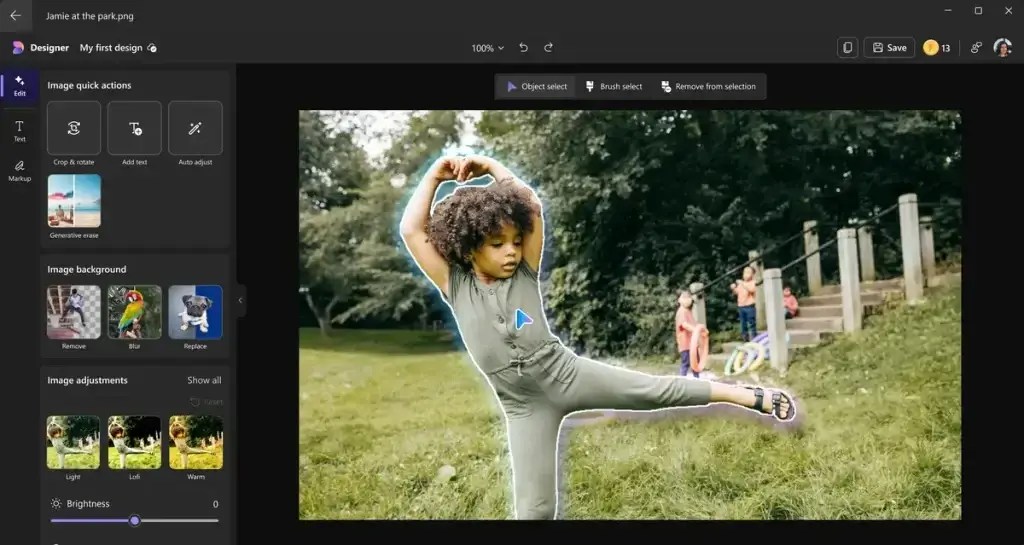
At the heart of the Designer app is its AI-powered engine, which leverages advanced machine learning algorithms to assist users in creating eye-catching designs. The app’s intuitive interface guides users through the creative process, offering suggestions and automatically generating design elements based on user input. This AI assistance is particularly beneficial for those who may lack formal design training, as it helps bridge the gap between vision and execution.
One of the standout features of the Designer app is its ability to generate custom images from text descriptions. Utilizing the DALL-E 3 model, users can simply type in a description of the image they envision, and the AI will create unique visuals that match the input. This feature opens up a world of possibilities for creating original artwork, illustrations, and graphics without the need for extensive artistic skills or expensive software.
The app also boasts an extensive library of templates covering a wide range of use cases, from social media posts and digital invitations to business presentations and marketing materials. These templates serve as excellent starting points, which users can then customize to fit their specific needs. The AI assists in this customization process by offering intelligent suggestions for layout improvements, color schemes, and font pairings.

Another powerful feature of the Designer app is its ability to edit and enhance existing images. Users can remove backgrounds, erase unwanted objects, and even generate new elements to add to their images, all powered by AI. This functionality is particularly useful for creating professional-looking product photos, cleaning up snapshots, or crafting composite images for various purposes.
The integration of GPT-3.5 into the Designer app brings an additional layer of creativity to the text elements of designs. Users can generate captions, headlines, and even full paragraphs of text that complement their visual creations. This feature is especially valuable for social media content creators and marketers who need to produce engaging copy to accompany their designs quickly.
Microsoft has also emphasized the app’s collaborative features, allowing users to share their designs easily with team members or clients. This functionality facilitates a smoother workflow for professional settings where multiple stakeholders may need to provide input on design projects.
Privacy and data security have been key considerations in the development of the Designer app. Microsoft assures users that their creations and personal information are protected by robust security measures, adhering to the company’s stringent privacy policies.
The launch of Designer for iOS and Android is not just about bringing a new app to mobile devices; it represents a shift in how we approach design and creativity in the digital age. By harnessing the power of AI, Microsoft is lowering the barriers to entry for quality design, enabling individuals and businesses of all sizes to create professional-looking content without the need for extensive design expertise or expensive software suites.
As the app continues to evolve, Microsoft has plans to integrate more features and improve the AI’s capabilities based on user feedback and technological advancements. This commitment to ongoing development ensures that the Designer app will remain at the forefront of AI-assisted creativity.
The release of Microsoft Designer for iOS and Android is a game-changer in the mobile design space. It empowers users to unleash their creativity, streamline their design processes, and produce high-quality visuals with unprecedented ease. As AI technology continues to advance, we can expect even more innovative features to be added to the app, further revolutionizing the way we approach design in our increasingly digital world.
Download Microsoft Designer on iOS.
Download Microsoft Designer on Android.
Discover more from Microsoft News Now
Subscribe to get the latest posts sent to your email.